Updated October 2026. We first published this post in September 2024. Since then the fee per ticket has dropped from 70¢ to 39¢, and TixFox has picked up Tap to Pay, recurring events, donations, team roles, ad tracking pixels and a lot more. We rewrote it so it matches how TixFox works today.
TixFox is an event ticketing platform that charges 39¢ per ticket. No monthly fee, no setup fee, and no percentage of your ticket price.
That's the short version. The rest of this post is the long one: what you get for 39¢, how the money moves, what a 38-year-old tattoo convention does with it, and the cases where TixFox isn't the right fit.
What is TixFox?
TixFox is an affordable event ticketing platform for independent organizers, nonprofits and small venues. You build an event page, sell tickets online and at the door, and check people in from your phone, for a flat 39¢ per paid ticket and nothing at all on free events.
It runs in your browser, so there's nothing to install to manage your events. The only app is the optional one for checking people in at the door. Payments run through Stripe, and the money lands in your own Stripe account as each order comes in. TixFox never holds your ticket revenue, so there's no payout to wait for after the event.
What TixFox costs: 39¢ a ticket, and that's the whole bill
Here's every fee, from the TixFox pricing page:
- Paid tickets: $0.39 each. Tickets priced under $5 are $0.30.
- Free events: $0, with the same features as paid events.
- Monthly fee, setup fee, contract: none.
- Card processing: Stripe's standard rate (2.9% + 30¢ per transaction in the US), which goes to Stripe, not TixFox.
You decide who pays those fees. With ticketing fee control you can fold them into your ticket price so buyers see one clean number, or show them as a separate line at checkout. Neither is wrong. It depends on your audience. And if your buyers aren't paying in dollars, you can price an event in any of 18 currencies, from Canadian and Australian dollars to euros, pounds, Swiss francs and Thai baht.
What 39¢ looks like next to Eventbrite
Eventbrite charges a service fee of 3.7% + $1.79 per paid ticket, plus 2.9% per order for payment processing, according to its organizer pricing page in October 2026. Take a 200-ticket show at $25. Eventbrite's service fees come to $543. TixFox's come to $78. That $465 gap is a month of ads, a better PA, or simply money you keep.
The gap gets wider as tickets get pricier, because TixFox has no percentage. At $100 a ticket, Eventbrite's service fee is $5.49. TixFox's is still 39¢.
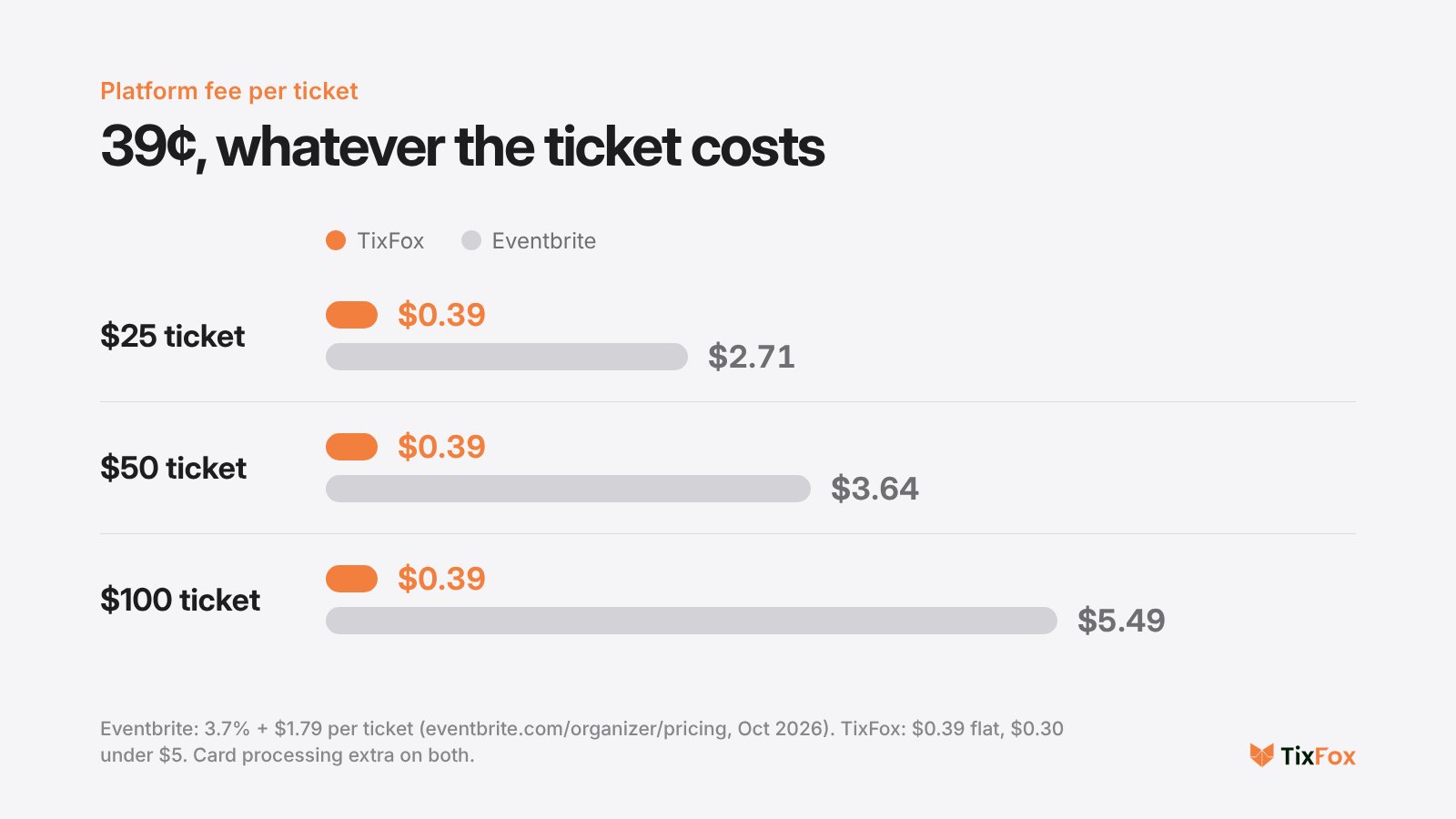
Platform fee only. Card processing is charged on top by both: Stripe's 2.9% + 30¢ on TixFox, Eventbrite's 2.9% per order.
Want your own numbers? Put your ticket price and expected sales into the savings calculator on the TixFox homepage, or create a free account and set up a draft event. No credit card needed.
How TixFox works, from sign-up to the door
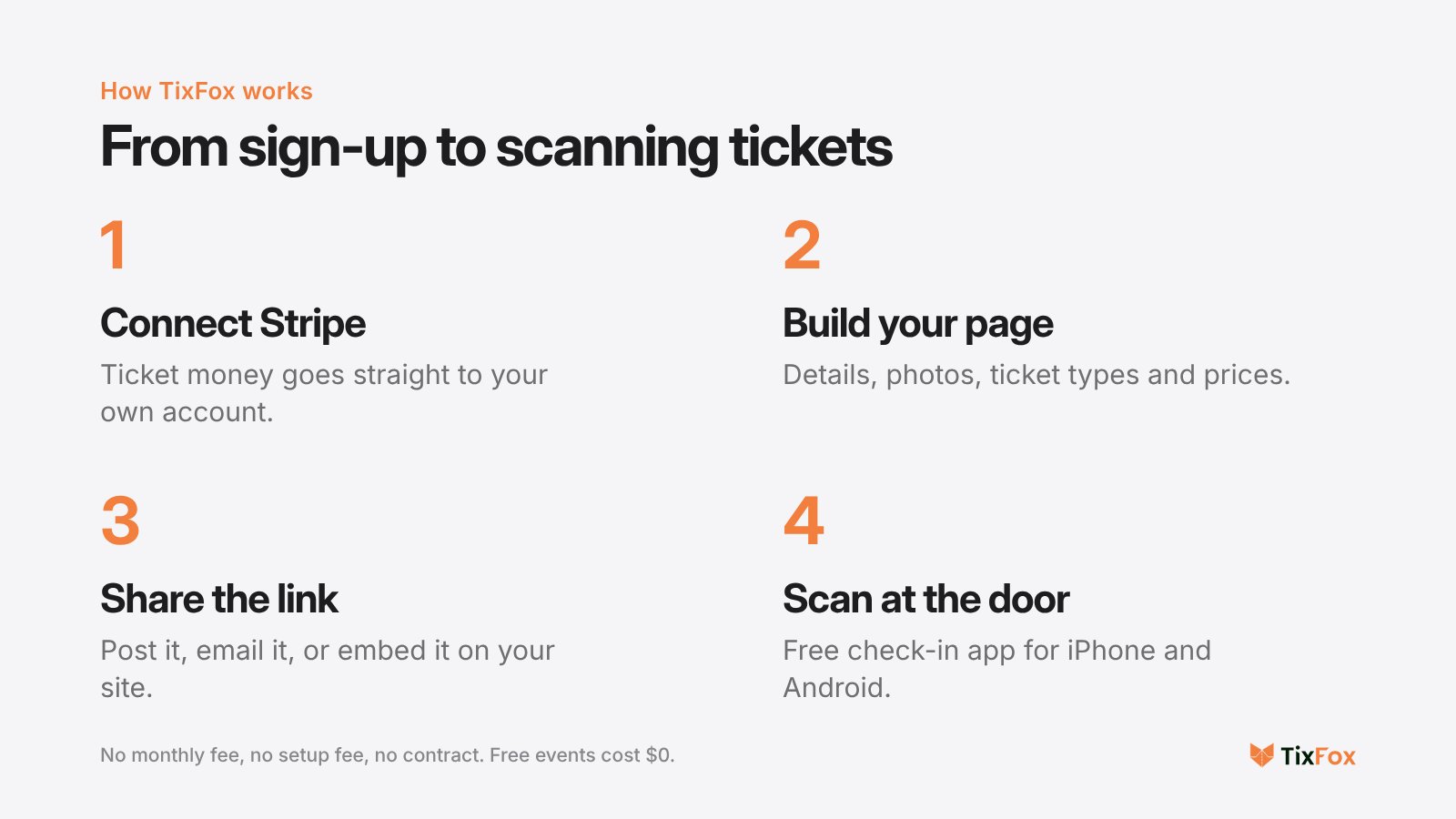
- Connect Stripe. Create a free TixFox account and link a Stripe account. If you don't have one yet, opening one is free and takes a few minutes.
- Build your event page. Add the name, date, venue, description and photos. Then add ticket types. Each one gets its own price, quantity, sale window and per-order limit, so an early bird tier can close on a set date and general admission takes over without you touching anything.
- Share your link. Post it, email it, put it in your bio. Or sell on your own website: there's a WordPress plugin, a Framer plugin, and an embed code for any other site, so buyers check out without leaving your page.
- Check people in. The free TixFox check-in app for iPhone and Android scans each QR ticket and shows green or red. It blocks duplicate scans, and several people can scan at once.
The second event is quicker than the first. Duplicate an event you've already run, choose what comes along (ticket types, add-ons, checkout questions, emails, theme), and change only the dates and prices.
Here's the whole setup on screen, from a new event to tickets on sale:
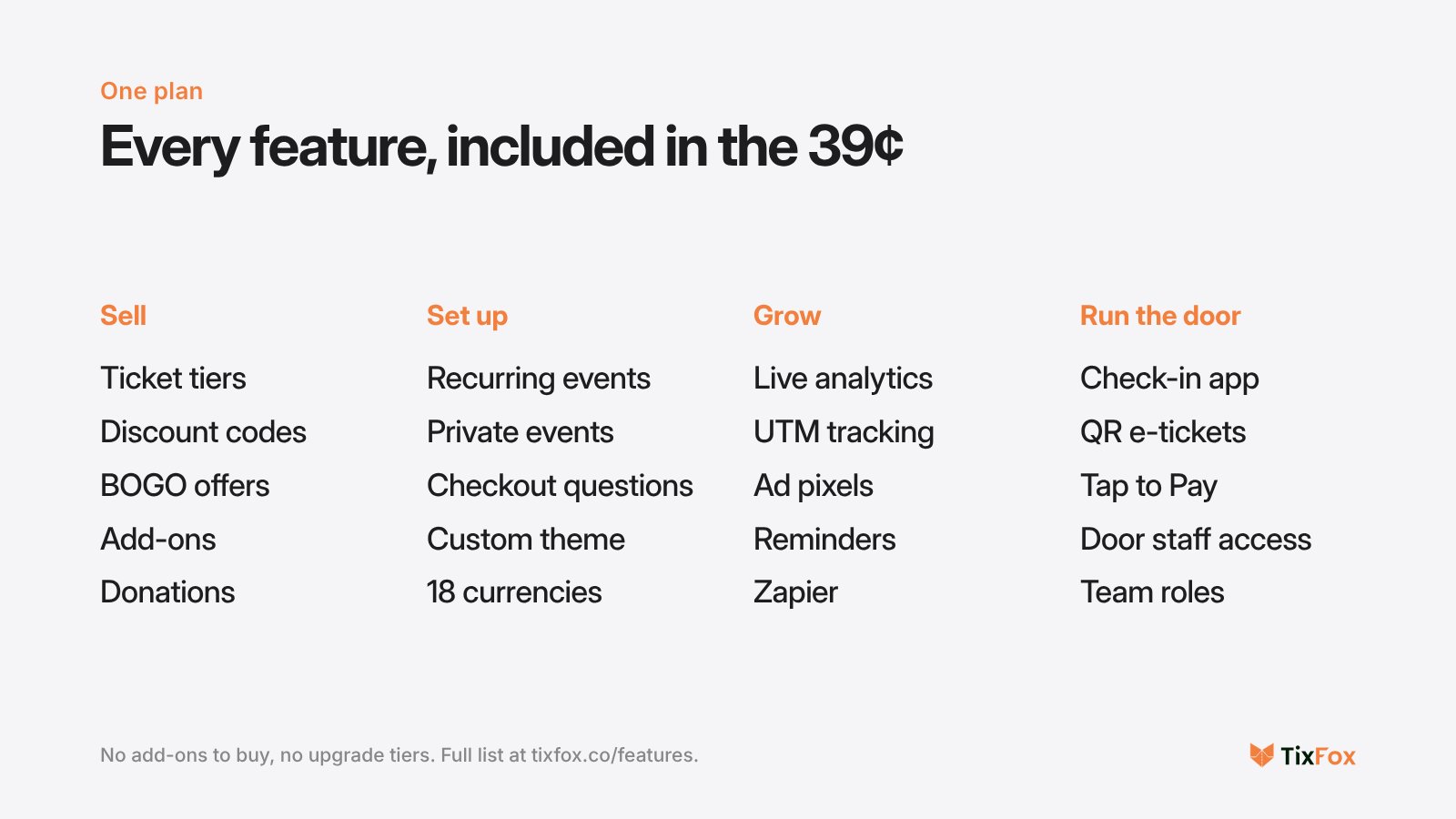
Everything you get for the 39¢
There are no plans to compare and no upgrade tiers. Every feature below comes with every account, including accounts that only run free events.
Sell more tickets
Discount codes can take a percentage or a flat amount off, with limits and expiry dates. BOGO offers go a step further: set up "buy 2, get 1 free" and the free ticket lands in the buyer's cart by itself, no code to remember. Add-ons let people buy merch, parking or a VIP upgrade in the same checkout, and ticket tags like "FREE Parking" make it obvious what each tier includes.
For fundraisers there's pay what you can pricing and donations at checkout: up to six preset amounts plus a custom one, and even donation-only orders for supporters who can't attend. TixFox takes nothing from donations. No ticket fee, no cut.
Run any kind of event
Weekly classes and seasonal runs don't need a new page per date. Recurring events generate every date from one rule (daily, weekly or monthly), let you change the price or capacity of any single date, and let buyers pick their slot from a calendar.
A passcode keeps invite-only events private, either by hiding the whole page or just the ticket selection. Custom checkout questions collect what you need, like meal choices, T-shirt sizes or a signed waiver. You can restyle the page with a custom theme, show it in another language, rewrite the confirmation email, and attach a PDF invoice for buyers who need to expense their ticket.
Know which promotion actually sold the tickets
The dashboard updates as orders come in, gross or net, with a breakdown by link, campaign, city and device. Add UTM tags to your links and every sale is credited to the post, email or partner that produced it. You can also connect your Meta Pixel, Google Analytics 4, Google Tag Manager, Reddit or X pixels without code, and purchases report back with their real order value, so your ad platform knows which ads earn money.
Automated reminder emails go out before the event to cut no-shows. And if you live in other tools, TixFox connects to more than 7,000 apps through Zapier, including Mailchimp, Google Sheets and HubSpot.
Handle the door, and the team
Tap to Pay turns the same check-in app into a card reader. A walk-up buyer taps their card, phone or watch on the back of your phone, the ticket is issued on the spot, and the sale shows up in the same dashboard as your online orders. No card reader to buy.
For the people helping you, check-in assistants can scan and look up tickets for the events you assign them, without seeing your sales or payouts. Bigger teams get four roles: Admin, Finance Manager, Scanner and Viewer. You can also run several organizations from one login.
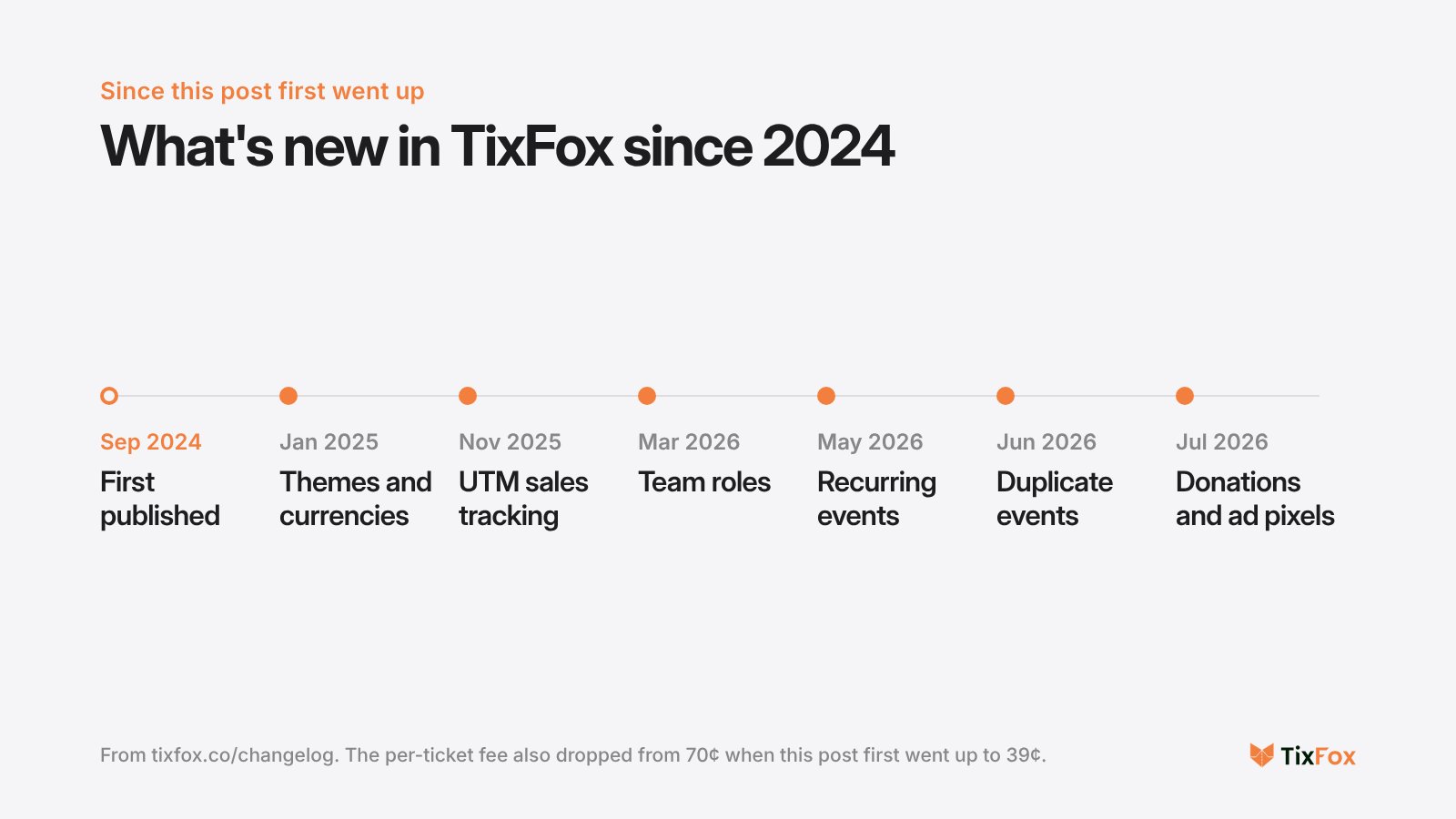
The full list of updates, with dates, is in the TixFox changelog.
How the Richmond Tattoo & Arts Convention sells tickets with TixFox
Every October since 1988, the Richmond Tattoo & Arts Convention has taken over the Koger Center in Richmond, Virginia: three days, more than 170 tattoo artists and about 3,500 attendees. It bills itself as the longest-running tattoo convention in the world, and its tickets run on TixFox.
Sam Dakart, who handles the convention's marketing, says two problems followed them from platform to platform. Nobody could tell them which ads actually sold tickets, and embedded checkouts looked clunky on phones and carried someone else's branding. With TixFox, every campaign link carries a UTM tag and every sale reports back to its source. The checkout sits on their own Framer site.
"I've worked with a handful of other ticketing platforms, and this one has been the best for our needs." Sam Dakart, marketing, Richmond Tattoo & Arts Convention
Their tickets run from day passes up to a $725 VIP Ultra package, which is where a flat fee matters most. Under Eventbrite's 3.7% + $1.79 formula, a single $725 ticket would carry a $28.62 service fee. On TixFox it's 39¢. Sam's take: the low fees give attendees "more buying power to get our pricier ticket options." Read the full Richmond story.
When TixFox isn't the right fit
We'd rather you pick the right tool than switch twice. TixFox is probably not for you if any of these apply:
- You sell assigned seats. TixFox doesn't do reserved seating maps. Theaters that sell row and seat numbers need a platform built for that.
- You can't use Stripe. All payments run through Stripe, so you'll need a Stripe account in a country Stripe supports.
- You need a marketplace to find buyers for you. TixFox is built for selling to an audience you bring: your followers, your list, your website. Eventbrite's discovery audience is a real advantage if you have none of those yet.
- You expect platform fees back on refunds. You can refund buyers any time through Stripe, but TixFox's per-ticket fee isn't refunded once a ticket has sold.
What your ticket buyers get
Most tickets are bought on a phone, often on impulse, so the checkout is built for that moment. Buyers can pay with a card or with the wallet already on their phone, and their QR e-ticket arrives by email straight away. If they ask about security: card details are handled by Stripe, which is certified PCI-DSS Level 1, and TixFox never stores full card numbers. If you've switched invoices on, a PDF invoice is attached to their confirmation for their expense report.
Why it's called TixFox
"Tix" for tickets, "Fox" for quick and clever. The goal hasn't changed since 2024: you should be able to build a whole event before you finish your morning coffee. We call it 3 Sips, and you're done.
Frequently asked questions
Is TixFox free to use?
Free events cost nothing. For paid events TixFox charges $0.39 per ticket ($0.30 under $5), plus Stripe's card processing fee. There's no monthly fee, setup fee or contract, and you can pass the fees on to buyers if you prefer.
How do I get paid?
Through Stripe Connect. Each sale goes straight into your own Stripe account as it happens, and you move the money to your bank on your own schedule. TixFox never holds your funds.
Can I sell tickets at the door?
Yes. Tap to Pay in the free TixFox app turns an iPhone or Android phone into a contactless card reader, with no extra hardware. The ticket is issued instantly and the sale appears in your dashboard next to your online orders.
Does TixFox work with my website?
Yes. Use the WordPress plugin, the Framer plugin, or an embed code that works on any other site. Buyers pay without leaving your page. Our guide to selling event tickets on WordPress walks through the setup.
Can I issue refunds?
Yes, through your connected Stripe account, on whatever policy you set. TixFox's per-ticket fee isn't refunded once a ticket has sold, so it's worth writing your refund policy on the event page from the start.
How do I reach TixFox support?
Email [email protected] (replies usually within 24 hours on business days), message +1 (224) 4-TIXFOX on WhatsApp, or use the live chat on tixfox.co. The help centre has step-by-step guides with screenshots.
Put your first event on sale
Create a free TixFox account. There's no credit card to enter, and your first event can be live before your coffee goes cold. Rather look around first? Watch the TixFox demo or browse the full feature list.
Keep reading:
Keep more of every ticket sale.
- 39¢ per ticket, $0 on free events
- No monthly fee, no contract
- Get paid as each sale comes in