Updated October 2026: rewritten as a full step-by-step plan with a video walkthrough, a free checklist, and corrected fee numbers read off the real checkout. Checked October 16, 2026.
Quick answer
To plan a class reunion, start 9 to 12 months out with 3 to 6 people who each own one job. Plan for 10 to 15% of your living classmates (20 to 25% of the class size once partners come), read the venue contract before you sign, and open a bank account in the reunion's name. Price the ticket from your real cost per guest, sell an early bird that ends two months out, and stop sales on the venue's headcount date.
- Turnout: a class of 300 is about 60 people on the night, not 200.
- Venue: ask about the food and drink minimum, the deposit, and the final headcount date.
- Money: a free EIN from irs.gov, a reunion bank account, two people on the statements.
- Price: most local reunions charge $40 to $75. Work out your own cost per guest first.
- Tickets: paid tickets are your headcount. On TixFox it's 39¢ a ticket plus card processing, and the buyer can pay the fees.
Somebody in the group chat wrote "We should do a reunion! 10 years 😱", two people replied "I'm in", and now you're the one planning it. You probably have a day job, a vague memory of who was in homeroom, and no idea how many people will actually show up.
The hard parts aren't the decorations. They're the headcount, the venue deposit, and the money. Under one popular reunion planning video, the question organizers asked most was some version of "Whose bank account does it go in?" This guide covers that, and everything else, in the order you'll need it.
Download the free one-page class reunion checklist (PDF)
Watch: plan a class reunion in 8 minutes
The video goes step by step: the team at 0:34, turnout at 1:05, the venue contract at 1:42, the bank account at 2:14, the price at 2:48, selling tickets at 3:39, finding people at 5:02, making it worth coming at 5:46, the night at 6:44, and the week after at 7:04.
How to plan a class reunion in 10 steps
Step 1: Start early, with a small team
Start 9 to 12 months before the date. Texas A&M's guide for class-led reunions says 8 to 12 months, and you'll want the extra time for finding people.
Don't do it alone, and don't wait for a big committee either. Three to six people is plenty. In the comments under reunion planning videos, the real committees sound like "me and 3 others" and "I'm doing EVERYTHING." Give each person one job:
- Venue: books the room and is the only one who talks to the venue, so nobody gets mixed messages.
- Treasurer: handles the money and the bank account.
- Finder: tracks down classmates and keeps the list.
- The night: runs the door, the name tags and the program.
Pick the date early too. A Saturday in summer or early fall is the classic. Check it against graduations, holidays and the big local game before you announce anything.
Step 2: Guess low on turnout
Everything else depends on one number: how many people will really come. Almost everyone guesses too high.
A successful reunion gets 10 to 15% of the living class, according to the reunion guide the Washington Township Schools Foundation gives its class volunteers. With partners, that's 20 to 25% of the class size. So for a class of 300, plan for about 60 people. Not 200.
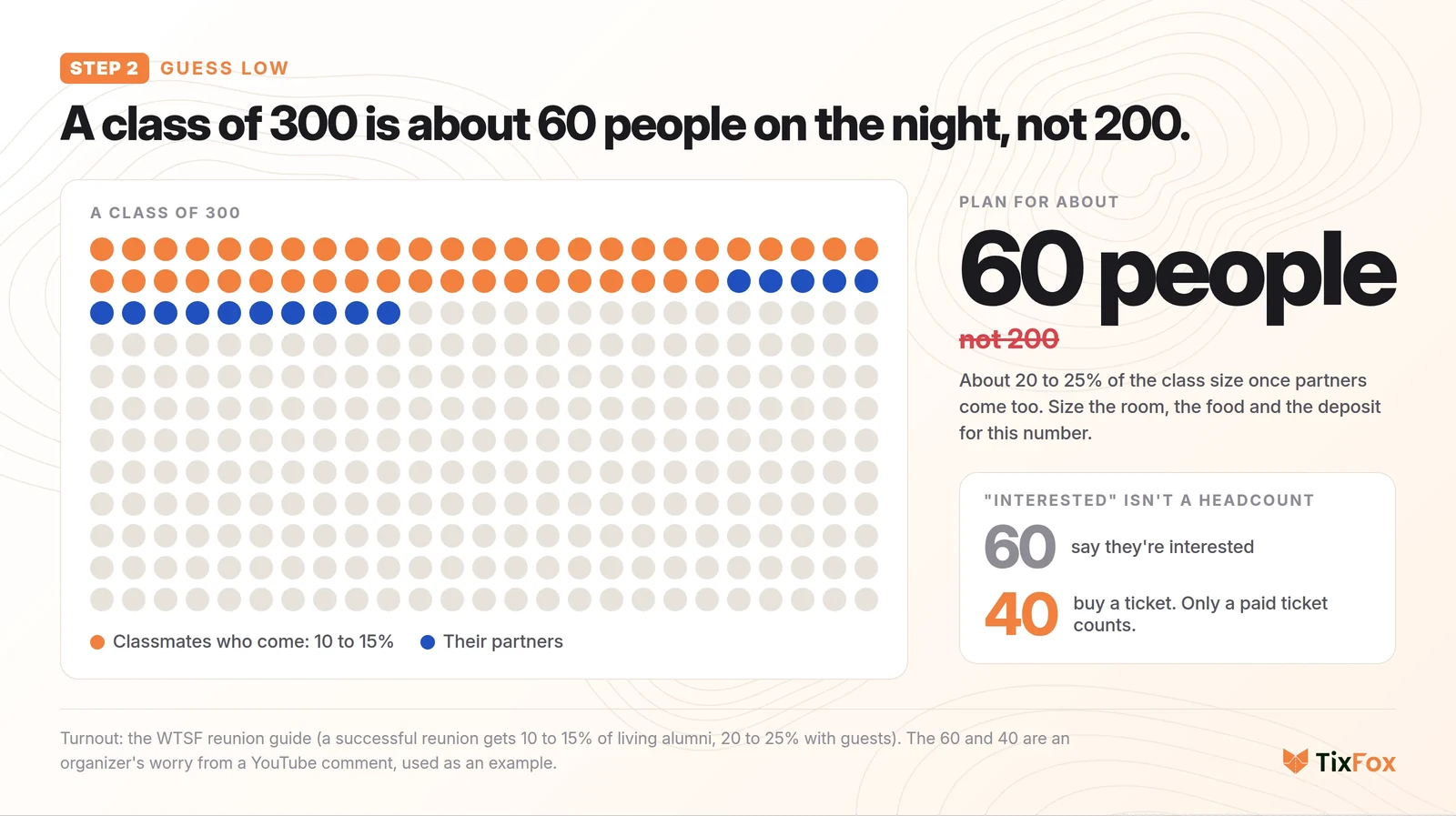
And "interested" isn't a headcount. One organizer planning a 15-year reunion put the worry perfectly: what if 60 people say they're interested in attending, but only 40 end up actually buying a ticket? Facebook "going" clicks and survey answers don't pay the venue. Only a paid ticket counts, which is a big reason to sell tickets instead of collecting RSVPs (more on that in step 6).
Step 3: Read the venue contract before you sign
This is where reunions lose money. The Minnetonka schools' reunion guide warns that some classes "got stuck with a large bill when they didn't have the attendance they expected." Before you sign anything, ask three things:
- Is there a food and drink minimum? If the minimum only works with 100 people and you're expecting 60, the other 40 come out of your pocket. Find a smaller room.
- How much is the deposit, and can you get it back? Texas A&M's guide advises avoiding large non-refundable deposits.
- When do they need the final headcount? Write that date down. It's the real deadline for your ticket sales and your refund policy.
Classes that sign a big contract on hope end up paying the difference themselves. A smaller room that's full feels better than a ballroom that's a third empty anyway.
Step 4: Give the reunion its own bank account
Don't run reunion money through your personal checking account. It's messy at tax time, it's awkward if anything goes wrong, and classmates feel better paying the reunion than paying you.
The clean answer: get a free EIN (an employer identification number, which works as a tax ID) from the IRS. The IRS's own page warns about websites that charge for one; you never have to pay. Banks will open a club account in the reunion's name with it. Have two people see every statement.
One thing not to promise: a reunion ticket isn't a tax-deductible donation. The IRS has turned down a group holding class reunion funds that asked for tax-exempt status, because a reunion is a social event. If your school's alumni office or foundation offers to hold the money for you, that's a fine option too; ask them how payments work. (This isn't tax advice.)
If you sell tickets online, connect the payment account early. With Stripe, your very first payout typically arrives 7 to 14 days after your first live payment, so set it up well before the venue deposit is due. Our Stripe ticketing guide has the full payout timing.
Step 5: Price the ticket from your real cost per guest
Start with what you pay no matter how many people come: the room, the DJ, name tags, printing and decorations. Divide that by your low headcount from step 2. Then add food per head.
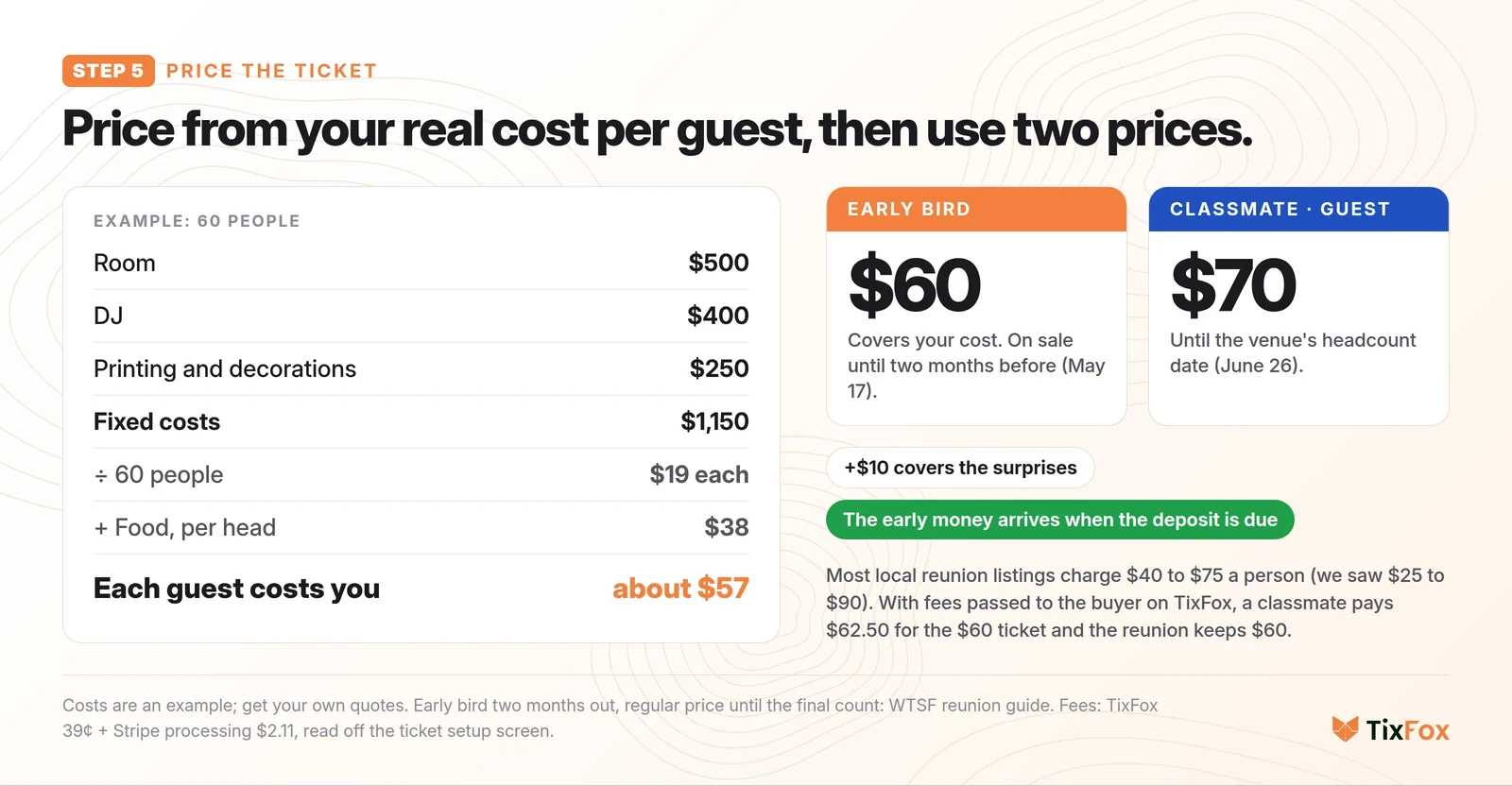
Here's an example. The room is $500, the DJ is $400, and printing and decorations are $250. That's $1,150, or about $19 a person for 60 people. Food is $38 a head. So each guest costs you about $57.
Most reunions in local listings charge between $40 and $75 a person (we saw a range of $25 to $90), so $57 is normal. Now use two prices:
- Early bird, $60, which covers your cost, on sale until two months before the reunion.
- Regular, $70, until the venue's headcount date. The extra $10 covers the surprises.
The WTSF guide uses the same structure: an early bird deadline about two months out, then the regular price until the final count. The early bird also pushes people to buy early, which is exactly when you need the money for the deposit.
Step 6: Sell tickets, and get the money in early
Checks in the mail, cash at the door, and twenty Venmo screenshots to match to names: that's how a treasurer loses a weekend. Selling tickets online fixes the headcount and the money at the same time, because people pay to RSVP.
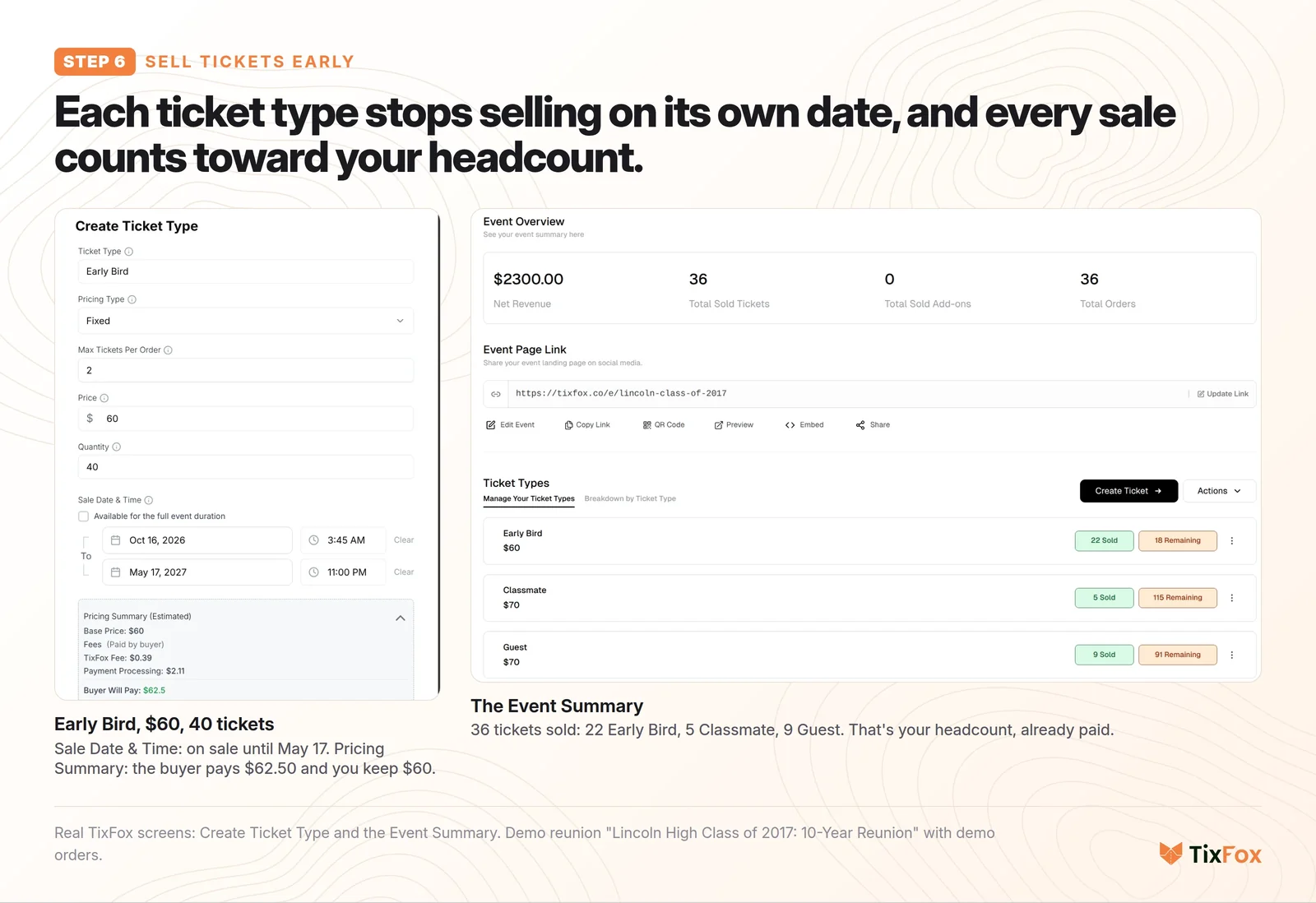
Here's the setup we used for a demo reunion in TixFox (it's what the video shows):
- Create the event: the name ("Lincoln High Class of 2017: 10-Year Reunion" beats "Class Reunion" when people search their inbox), the date and time, the venue, and a photo. Say exactly what the ticket includes: dinner, the DJ, the slideshow, bring a guest.
- Add the ticket types: Early Bird at $60 with a sale end date two months before. Then Classmate at $70 and a Guest ticket for partners, both ending on the headcount date.
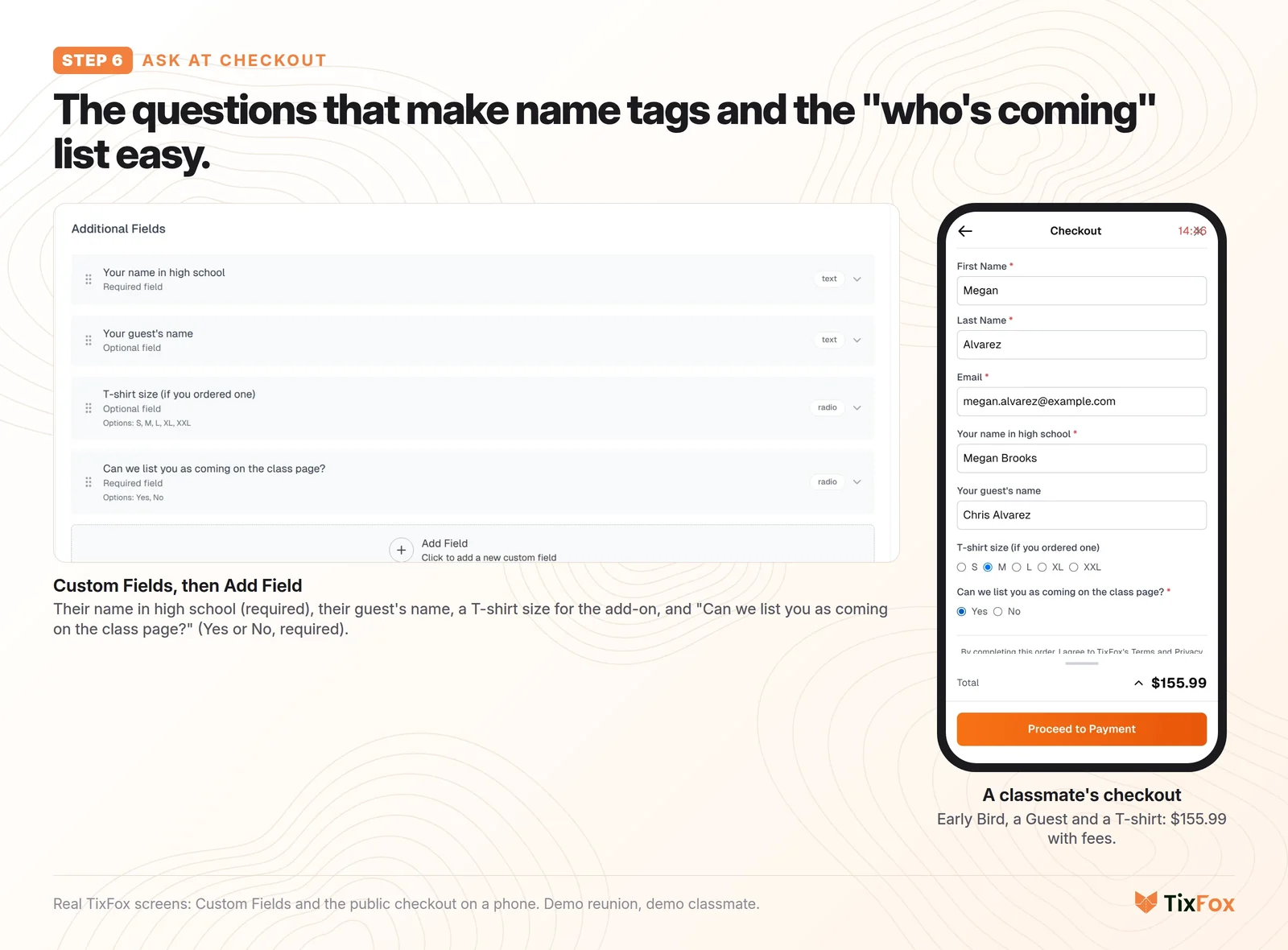
- Ask a few questions at checkout: their name in high school (a lot of people have changed their last name since), their guest's name for the name tags, and "Can we list you as coming on the class page?" You'll see why in step 8. Keep it to three or four questions, so checkout stays quick.
- Selling shirts? Add a reunion T-shirt as an add-on, so people order it with their ticket and you don't chase sizes later.
- Put your refund rule on the page, for example "Full refund until June 26, when we give the venue our final headcount." Our event refund policy guide has more wording.
- Give the event a short link, like tixfox.co/e/lincoln-class-of-2017, so it fits in a text.
On fees: TixFox charges 39¢ a ticket, plus card processing, and you can pass the fees to the buyer. On the $60 early bird, the classmate pays $62.50 (39¢ for TixFox, $2.11 for processing) and the reunion keeps the full $60. You can also absorb the fees if you'd rather show a round number. The pricing page has the details.
The money goes to the reunion's own Stripe account and on to its bank account, and your ticket count is your headcount.
Planning a reunion now? Set up your reunion on TixFox. It's free to start, and you only pay 39¢ when a ticket sells.
Step 7: Find everyone, then keep reminding them
A Facebook group is a great start, but a lot of your class won't be in it. Make a missing-classmates list from the yearbook and post it. Someone always knows where someone is. Ask everyone who buys a ticket to bring two names.
Then send four messages, using the same link in the group, in email and in texts:
- Six months out: save the date.
- The invite: the price, what's included, and the deadline.
- Before the early bird ends: a reminder.
- Three weeks before the headcount date: a last call, plus a phone call to the people you really want there.
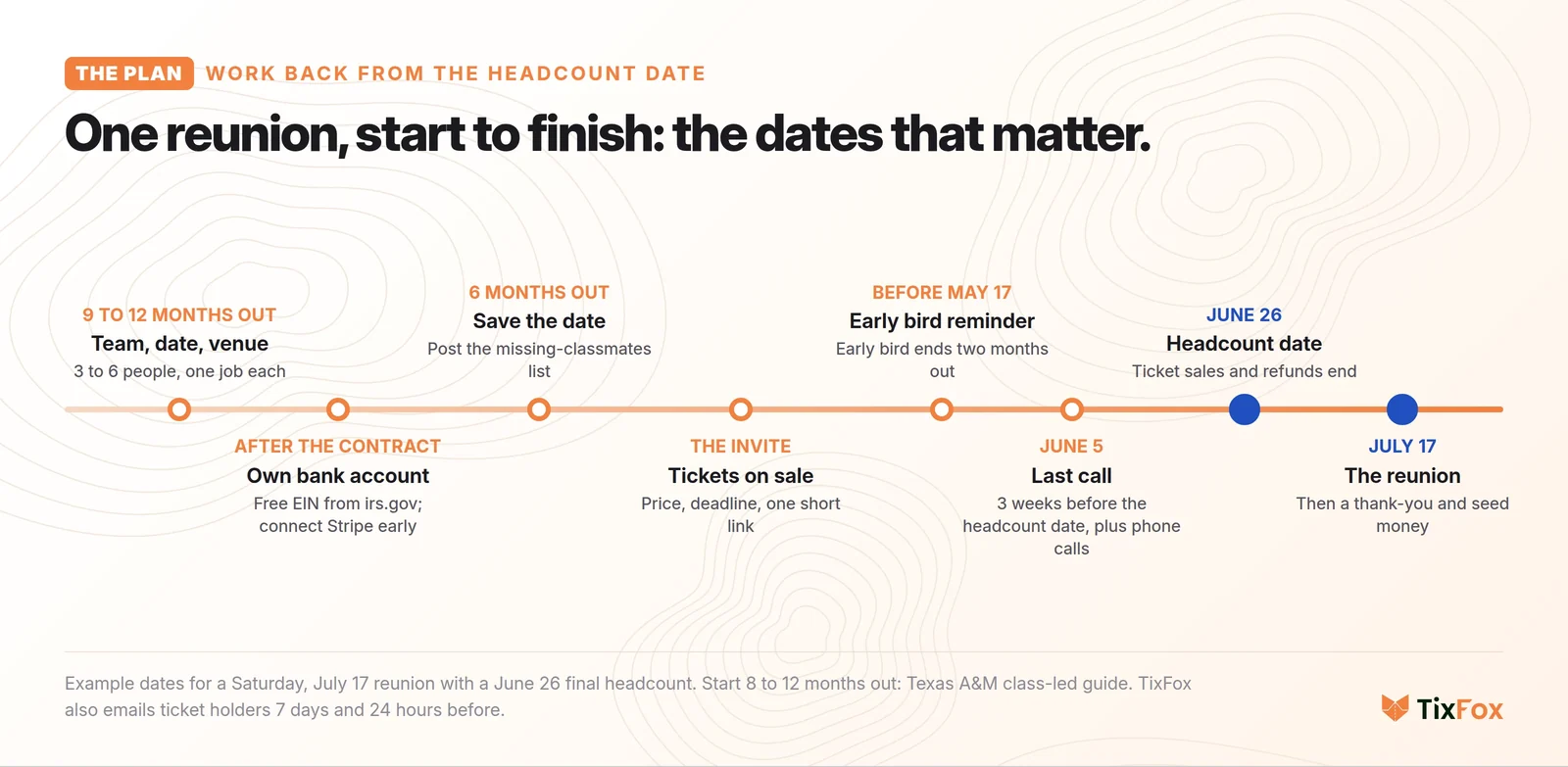
Once people have tickets, TixFox emails them reminders 7 days and 24 hours before the reunion, so the "wait, is that this Saturday?" messages take care of themselves.
Step 8: Make it worth coming
When people explain why they skipped their reunion, it's the same few reasons: none of my friends were going, the old cliques stood together all night, everyone just talked about work, and the trip cost too much. One commenter put it like this: "It was 200 miles away and the hotel was $150 a night. I passed." You can plan around almost all of it.
- Post who's already coming, using only the people who said yes to being listed at checkout. Your Orders export has that column. Nothing sells a reunion like seeing your old friends on the list.
- Put each person's senior yearbook photo on their name tag, a tip from both the Minnetonka and WTSF guides. Nobody has to fake remembering a name.
- Give people something to talk about besides jobs: a slideshow, a then-and-now photo wall, and a quiet table for the classmates who've passed away.
- For people traveling in, get a hotel block, and think about a cheap, casual Friday meetup for anyone who can't make the big night.
There's one reason you can't fix: some people had a rough time in high school and won't come back. That's fine. Don't take it personally.
Step 9: The night
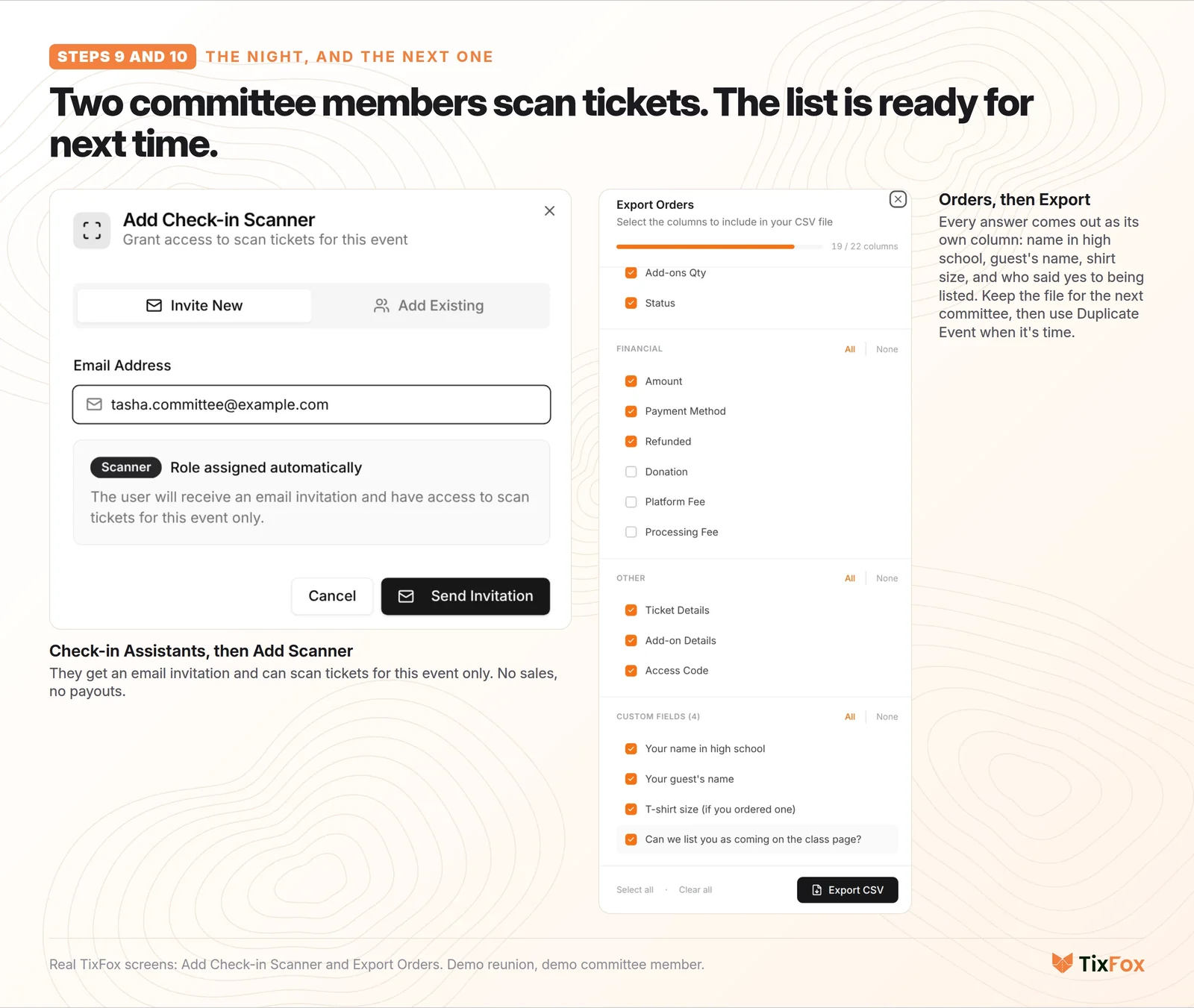
Put a welcome table right at the door, with the name tags in alphabetical order. In TixFox, add two committee members as check-in assistants. They get an email invitation, scan tickets on their phones, and can only scan tickets for this event, so they can't see the sales or the payouts. Swap them every half hour so nobody spends the whole reunion at the door.
Print the guest list the night before, in case the venue's Wi-Fi is bad or a phone dies.
Step 10: The week after
Send a thank-you with the group photo. Ask for a few dollars of seed money toward the next reunion (another WTSF tip), so next time nobody fronts the deposit.
Keep the list, too. Export your orders, and the next committee starts with everyone's name, email and name in high school. When it's time, use Duplicate Event in TixFox, and the tickets and questions are already there.
Common class reunion planning mistakes
- Signing the venue before you know your number. Use the 10 to 15% rule and read the minimum.
- Counting "interested" as coming. Only a paid ticket counts.
- Running the money through someone's personal account. Get the EIN and open a reunion account.
- Pricing from hope. Divide fixed costs by your low headcount, not your dream headcount.
- One price until the last week. Without an early bird deadline, most people buy late, after the deposit is due.
- Promising a tax deduction. A reunion ticket isn't a donation.
- One person doing everything. Give each person on the team one job, and one voice to the venue.
FAQ
How far in advance should you plan a class reunion?
Start 9 to 12 months before the date. That gives you time to book a venue, open a bank account, find classmates and send four messages. Big milestone reunions (25th, 50th) can start even earlier, because finding people takes longer.
How many people come to a class reunion?
A successful reunion gets about 10 to 15% of the living class, or 20 to 25% of the class size once partners come. For a class of 300, plan for about 60 people.
How much should you charge for a class reunion ticket?
Most local reunion listings charge $40 to $75 a person. Work out your cost per guest (fixed costs divided by your low headcount, plus food per head), then sell an early bird at about that price and a regular price around $10 higher.
Who should hold the money for a class reunion?
The reunion should, not a person. Get a free EIN from irs.gov and open a bank account in the reunion's name with two people seeing the statements, or let your school's alumni office hold the funds if it offers to.
Is a class reunion ticket tax-deductible?
No. A reunion is a social event, not a charity, and the IRS has denied tax-exempt status to a group holding class reunion funds. Don't describe tickets as donations.
Plan yours
Grab the free one-page checklist, find your three to six people, and call the venue with your three questions. When you're ready to sell, set up your reunion on TixFox: it's free to start, 39¢ a ticket, and the buyer can pay the fees.
Sources
- Washington Township Schools Foundation reunion guide: 10 to 15% of living alumni (20 to 25% with guests), an early bird deadline two months out and the regular price until the final count, senior photos on name tags, seed money for the next reunion.
- Texas A&M class-led reunion planning guide: start 8 to 12 months out, estimate conservatively, avoid large non-refundable deposits.
- Minnetonka schools reunion planning guide: classes that "got stuck with a large bill", senior picture name tags.
- University of Victoria alumni reunion handbook: plan how a minimum-spend shortfall is covered.
- IRS: Get an employer identification number: free, and a warning about sites that charge for one.
- BankersOnline: EIN or SSN needed to open a class reunion account.
- Tax Notes: group holding class reunion funds denied exempt status.
- Stripe Docs: Payouts: the first payout typically arrives 7 to 14 days after your first live payment.
- Ticket prices: local reunion listings (Patch, WHAV, Press Herald and others), $25 to $90, mostly $40 to $75.
- Quotes: YouTube comments under reunion planning and "why I skipped my reunion" videos (553 comments read, no names shown).
- TixFox dashboard, demo account, October 16, 2026: ticket types with a sale end date, the buyer-pays pricing summary ($62.50 on $60), custom fields, add-ons, refund policy, short link, check-in assistants, Orders export, Duplicate Event, reminder emails.
The reunion ("Lincoln High Class of 2017" at "Riverside Hall"), its classmates and its orders are demo data, and the costs are an example. The TixFox screens, the ticket page and the checkout are real.
Keep more of every ticket sale.
- 39¢ per ticket, $0 on free events
- No monthly fee, no contract
- Get paid as each sale comes in