On a 200-ticket show at $30 a head, Eventbrite's current rate of 3.7% + $1.79 per ticket plus 2.9% payment processing pulls about $580 out of the gate. The same event on a flat $0.39-per-ticket platform pays $78. That's a $502 swing on one show. Multiply by a season and you're looking at a sound upgrade, a venue deposit, or just the difference between a profitable year and a stressful one.
This guide walks through how to actually sell event tickets online in 2026, what the fee math looks like across the main platforms, and a 5-step launch path that takes about 10 minutes start to finish. It's written for independent producers, small venues, and first-time organizers. If you're running a 50,000-seat amphitheater, this isn't for you.
Why "How to Sell Event Tickets Online" Got Harder in 2026
The market shifted underneath organizers this year. In March 2026, Italian software holding company Bending Spoons completed a roughly $500 million acquisition of Eventbrite, taking the platform private. April 2026 brought announced staff cuts and a leaner-team mandate. None of that is inherently bad, but it's the kind of upheaval that tends to land on small organizers as longer support waits and tighter policies, not lower fees.
At the same time, the fee math hasn't gotten kinder. Independent fee analyses run in early 2026 put Eventbrite's effective rate around 10–14% on most ticket prices, climbing past 20% on cheap community-priced tickets where the flat $1.79 component dominates. A $10 workshop ticket on Eventbrite can carry a 21%+ effective fee after processing. That's the kind of number that quietly kills a $1,500 community event budget.
So "how do I sell tickets online" is a different question than it was three years ago. The honest answer in 2026 is: pick a platform whose pricing model doesn't punish you for selling cheaper tickets, doesn't sit on your cash for a week, and doesn't lock features behind monthly add-ons you didn't ask for.
What "Affordable Ticketing" Actually Means in 2026
Most platforms calling themselves "low-fee" still charge a percentage. That word matters. A 2% platform fee on a $25 ticket is $0.50. On a $95 wine-tasting ticket, it's $1.90. Same platform, same service, you pay nearly four times more for selling a higher-priced ticket. That's the silent tax on doing well.
A flat fee is the opposite. $0.39 per ticket whether the ticket is $15 or $150. For organizers running mid-to-premium events, festivals, fundraisers, recurring shows, or anything where ticket prices vary, this is the structure that compounds in your favor over the year.
Here's what affordable should actually mean in 2026:
A platform fee you can predict to the cent before you sell anything
No monthly subscription, no setup fee, no per-event "publishing" surcharge
Money in your hands as tickets sell, not held until after the event
The features you need to actually run an event included by default, not gated behind a Pro plan
That last point matters more than most pricing comparisons admit. A "free" plan that locks check-in scanning, custom branding, or attendee data behind a paid tier isn't really free. It's a fee delayed.
The Real Fee Math: 200 Tickets at $30 Each
Numbers do the convincing here. This is what platform fees look like on a single 200-ticket event at $30 per ticket (payment processing excluded since it's roughly equal across processors that use Stripe):
Platform | Per-ticket platform fee | Total platform fees on 200 tickets |
|---|---|---|
TixFox | $0.39 flat | $78 |
SimpleTix | $1.39 ($0.79 + 2%) | $278 |
TicketLeap | $1.60 ($1.00 + 2%) | $320 |
Humanitix (standard) | $1.62 ($0.99 + 2.1%) | $324 |
Eventbrite | $2.90 ($1.79 + 3.7%) | $580 |
Sources: pricing verified on each platform's public pricing page, May 2026. Eventbrite fee from eventbrite.com/organizer/pricing.
The gap between the cheapest and most expensive option on this single event is $502. Run that across a season of 10 shows and you're at $5,020. That's not a marketing claim, it's arithmetic.
A note on Humanitix: the platform donates 100% of its profits to children's education charities. For values-aligned nonprofits, that mission may genuinely be worth the extra dollar per ticket. We'd rather flag that honestly than pretend cost is the only variable.
Want to See Your Own Numbers?
Create a free TixFox account and price out your event in about three minutes. There's no credit card required and no setup fee. If the math doesn't work for your event, you walk away having lost nothing.
How to Sell Event Tickets Online: 5 Steps That Take About 10 Minutes
This is the actual setup flow for getting an event live. If you've never done this before, the first time runs about 10 minutes. After that it's closer to 3.
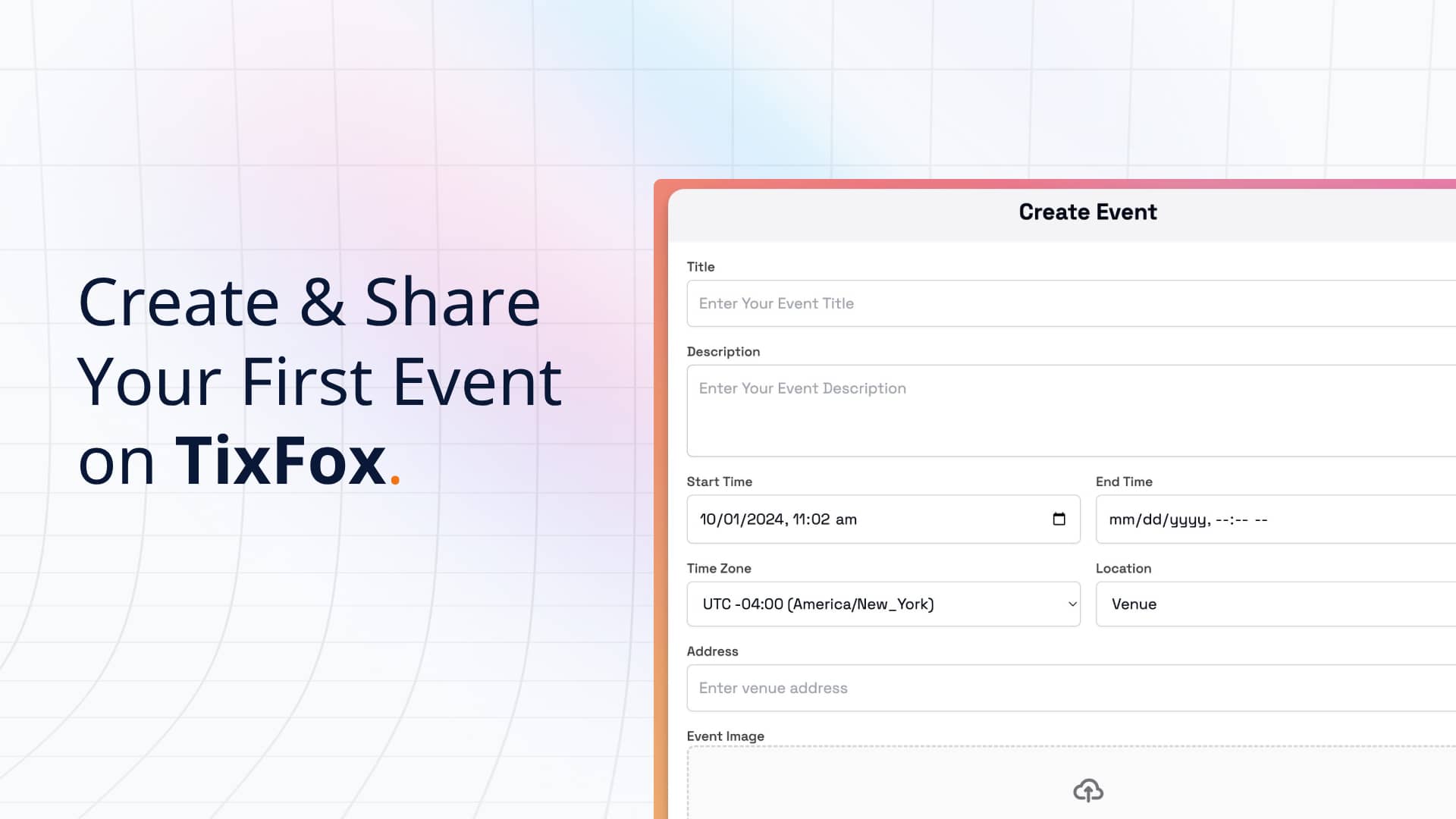
1. Create your event page. Name, date, location, description, image. The page is the public-facing thing buyers will see, so write the description like you're texting a friend who asked what the event is. Skip the jargon. Drop in a strong photo if you have one.
2. Set your ticket types. This is where most first-time organizers either overcomplicate or undersell themselves. Two or three tiers is usually plenty: general admission, an early-bird (priced 10–15% below GA, capped at maybe 30% of total inventory), and an optional VIP. Each tier gets its own price, its own cap, and its own sale window. Don't launch with eight ticket types. You'll regret it.
3. Connect your Stripe account. This is the step that decides where the money goes. On TixFox, revenue flows directly into your own connected Stripe account as tickets sell. The platform never holds the funds. You manage payouts to your bank the same way you would with any other Stripe income. Compare that to platforms that hold ticket revenue until after the event, which is the cash-flow killer for organizers paying venue deposits weeks in advance.
4. Add discount codes and protective settings. If you're running an invite-only fundraiser or a private corporate event, event passcodes let you either lock the entire event page or just the ticket selection until guests enter the code. Discount codes for early bird, partner promotions, or returning attendees can be flat-dollar or percentage, and you control who gets them and when. Set these up before launch so you're not scrambling later.
5. Go live and share the link. Copy your event URL, post it to your channels, embed it on your site if you have one. For WordPress sites, the TixFox WordPress plugin drops in a "Buy Tickets" button or full embed via the block editor in about two minutes. Buyers complete the purchase without leaving your site.
That's it. Five steps. The platform sends order confirmation emails with QR-coded tickets, your mobile check-in app pulls down the guest list, and you can watch real-time sales from your phone.
The Day-Of Logistics Most Guides Skip
The setup is the easy part. What separates a clean event from a chaotic one is what happens at the door.
A few things worth setting up before launch that organizers consistently underestimate:
Mobile check-in scanning. The TixFox iOS and Android apps scan QR codes, show a green or red result instantly, and block duplicate scans automatically. Run multiple devices simultaneously if you've got more than one entry point. Volunteers can use their own phones.
Custom checkout fields. If you need T-shirt sizes, dietary preferences, emergency contacts, or anything event-specific, collect it at checkout. Asking after the fact is the path to a half-filled spreadsheet and missing data on event day.
Invoice attachments. For corporate attendees or anyone expensing the ticket, automatic PDF invoices on the order confirmation email saves a customer-support thread later. It's an opt-in setting per event.
Checkout countdown timer. Buyers who start checkout are more likely to complete it when there's a visible countdown. Frame it honestly: it reduces drop-off, it doesn't pressure anyone into a purchase they didn't intend.
Where TixFox Isn't the Right Answer
Worth being honest about this. TixFox doesn't have reserved seating or a seating map. If you're running a theater with assigned seats or a stadium-style event where buyers pick specific row-and-seat positions, look at SimpleTix, which is genuinely built for that. There's no Eventbrite-style discovery marketplace either, so you won't get 89 million monthly users browsing for your event. If your sales depend entirely on platform discovery rather than your own audience, you'll pay more on Eventbrite, but you may get more sales. That tradeoff is real.
For everyone else, the flat fee plus instant payouts plus the feature set that ships in the box covers what independent event organizers actually need.
Frequently Asked Questions
What's the cheapest way to sell event tickets online in 2026? TixFox at $0.39 flat per ticket is the lowest per-ticket platform fee available to independent organizers in 2026, with no monthly fee and no setup cost. Tickets priced under $5 drop to $0.30 flat. Free events have zero platform cost. Payment processing (Stripe standard at 2.9% + $0.30 per transaction) is separate and applies on every platform that uses Stripe.
Can I sell tickets online for free? For free events (zero ticket price), yes. TixFox doesn't charge a platform fee on free tickets. For paid events, every legitimate platform charges something. Beware of "free" platforms that recover their costs by passing 8–12% fees through to your buyers without making it obvious.
How fast do I get paid after a ticket sells? On TixFox, ticket revenue lands in your connected Stripe account as the sale happens. TixFox doesn't hold the funds. You control payouts to your bank from your Stripe dashboard, the same as any other Stripe income. Compare that to Eventbrite's standard schedule, which releases funds a few days after the event completes.
Do I need my own website to sell event tickets? No. Your TixFox event page is a fully functional checkout link on its own. You can share it on social, by email, or in a text message. If you do have a website, the WordPress plugin and Framer plugin let you embed ticket sales directly so buyers never leave your site.
What about refunds? Refunds are managed from the TixFox dashboard. The Stripe processing fee on the original transaction is generally not refunded by Stripe, which is true on every Stripe-based platform, not just TixFox. Set a clear refund policy on your event page so buyers know what to expect.
Stop Paying Percentage Fees on Tickets You Worked to Sell
The platform you choose decides how much of your ticket revenue you actually keep. In 2026, the gap between the cheapest and most expensive option on a typical small-to-mid event is several hundred to several thousand dollars per year. That's not a minor optimization. That's the difference between reinvesting in your event and explaining to your team why there's no budget for it.
Create your free TixFox account and have your first event live in about 10 minutes. No credit card required to sign up, no monthly fee, and the platform fee on free events is zero. If you're switching from another platform, the TixFox pricing page shows you exactly what your event would cost before you commit.
About this post: TixFox is a flat-fee event ticketing platform built for independent event producers, nonprofits, and small venues. Platform fee is $0.39 per ticket with no percentage component, no monthly fee, and no setup cost. All competitor fees in this post sourced from each company's official pricing page, verified May 2026. For more comparisons, see our Eventbrite alternative guide for small events.
Keep more of every ticket sale.
- 39¢ per ticket, $0 on free events
- No monthly fee, no contract
- Get paid as each sale comes in