Updated October 2026: no-show rates now come from PheedLoop's check-in data from more than 1,070 events, and the guide has new charts, a reminder timeline, a checklist you can save and a short video on scanning tickets at the door.
Thirty people bought tickets to your event and didn't show up. At $25 a ticket, that's $750 in revenue you collected but didn't really earn, because you still paid for their food, their chairs, and their spot in a room that could have held someone else. If your event had a waitlist, those 30 empty seats could have been filled by people who actually wanted to be there.
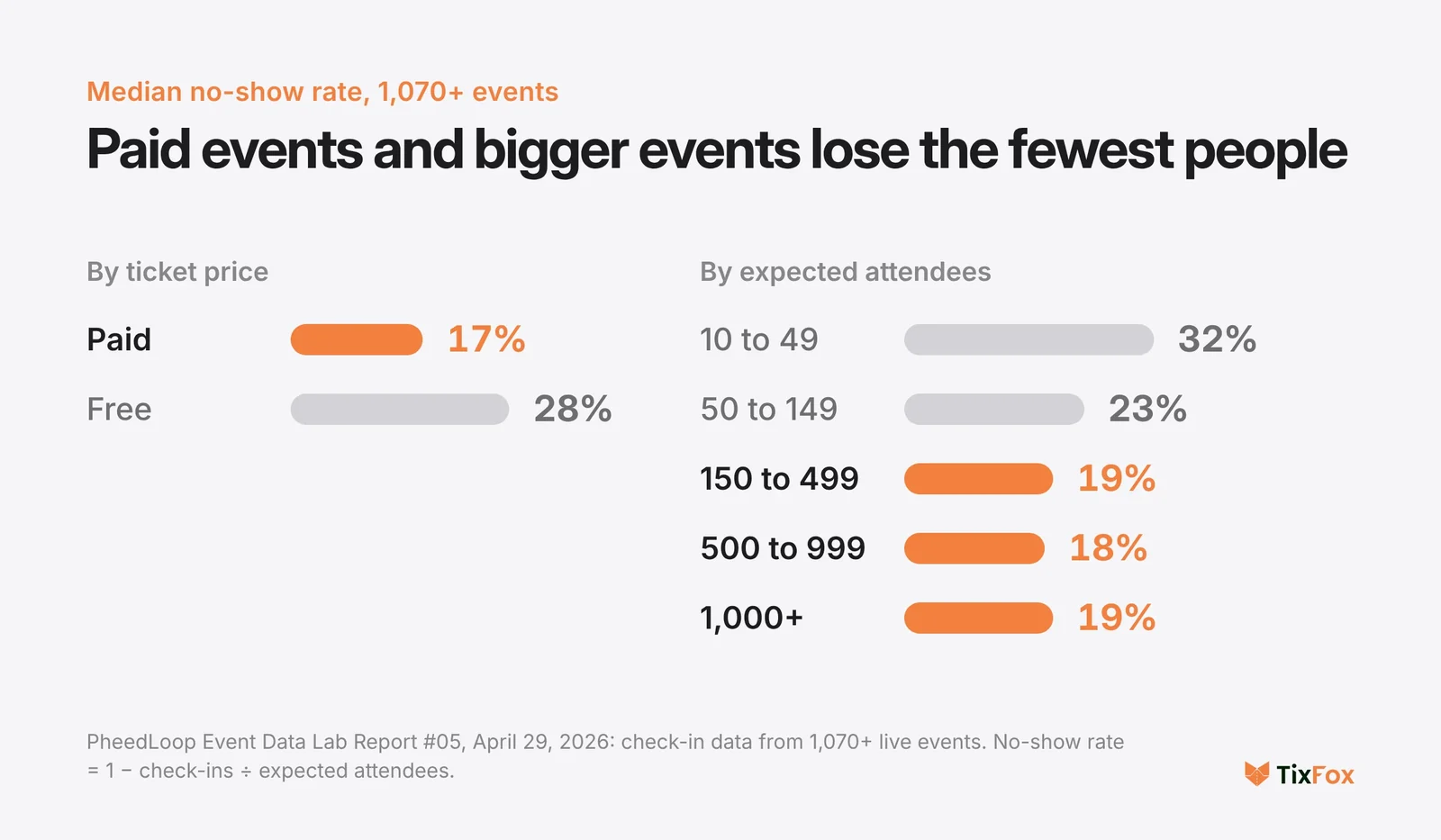
No-shows are the silent tax on every event. Across more than 1,070 events, the median no-show rate is about 17% for paid events and 28% for free ones, and small free events lose closer to 37%. And for small organizers running 100-to-300 person events, each empty seat hurts more because the margins are thinner and the catering is already ordered.
You can't eliminate no-shows. People get sick, cars break down, babysitters cancel. But you can cut your no-show rate in half with the right combination of pricing strategy, communication timing, and check-in process. Here are eight tactics that work at the scale most independent organizers actually operate.
Which events have the lowest no-show rates?
Paid events, and events big enough to fill a room. PheedLoop's Event Data Lab looked at check-in data from more than 1,070 live events in April 2026. The median no-show rate was about 17% for paid events and 28% for free ones. By size, events expecting 10 to 49 people lost about 32% of their registrants, and from around 150 expected attendees the rate settled near 19%.
The hardest combination is small and free: about 37% of people registered for free events of 10 to 49 didn't check in, against 17% at small paid events. The report doesn't break the numbers down by industry or event type, so price and size are the levers you can actually see. If your events are small or free, the first two tactics below matter most.
1. Charge Something, Even If It's Small
This is the single most effective lever you have. Free events have dramatically higher no-show rates than paid events. In PheedLoop's check-in data from more than 1,070 events, free events had a median no-show rate of 28%, against 17% for paid events. At small events of 10 to 49 people the gap is wider: 37% for free events and 17% for paid ones.
The reason isn't complicated. When people pay for something, they assign it value. A $5 ticket creates more commitment than a free RSVP, even though the dollar amount is trivial. The act of entering a credit card number and completing a transaction shifts the psychology from "I might go" to "I'm going."
If your event genuinely needs to be free (a nonprofit community event, a church outreach, an open house), consider a refundable deposit model. Charge $5 at registration and refund it when they check in. Or use a pay-what-you-can model where people choose their own amount. Even $1 changes the math on whether they'll actually show up.
Rachel Kim, who runs monthly art walks in Portland, OR, tested this in 2024. She switched her free community art walk to a $3 ticket and saw her no-show rate drop from 38% to 14%. She refunds the $3 at the door. The money isn't the point. The commitment is.
2. Send Reminders at the Right Times (The Number Alone Won't Save You)
Most "reduce no-shows" guides tell you to send reminders. That's obvious. What matters is when you send them and what they say.
Here's a reminder schedule that works well for events happening in the next two to four weeks:
One week before: A content-focused reminder. Skip the generic "your event is coming up" message. Tell them something new about the event: a speaker was just confirmed, the menu was finalized, or a surprise guest is joining. Give them a reason to re-engage, not a calendar nudge.
Two days before: A logistics email. Parking details, what to bring, what time doors open, dress code if relevant. This removes the small friction points that give people a reason to skip. "I don't know where to park" is surprisingly often the real reason someone doesn't show up.
Day of, morning: A short, warm message. "See you tonight. Doors at 6:30, show starts at 7. Here's the address one more time." Keep it to three or four sentences. This is a nudge, not a newsletter.
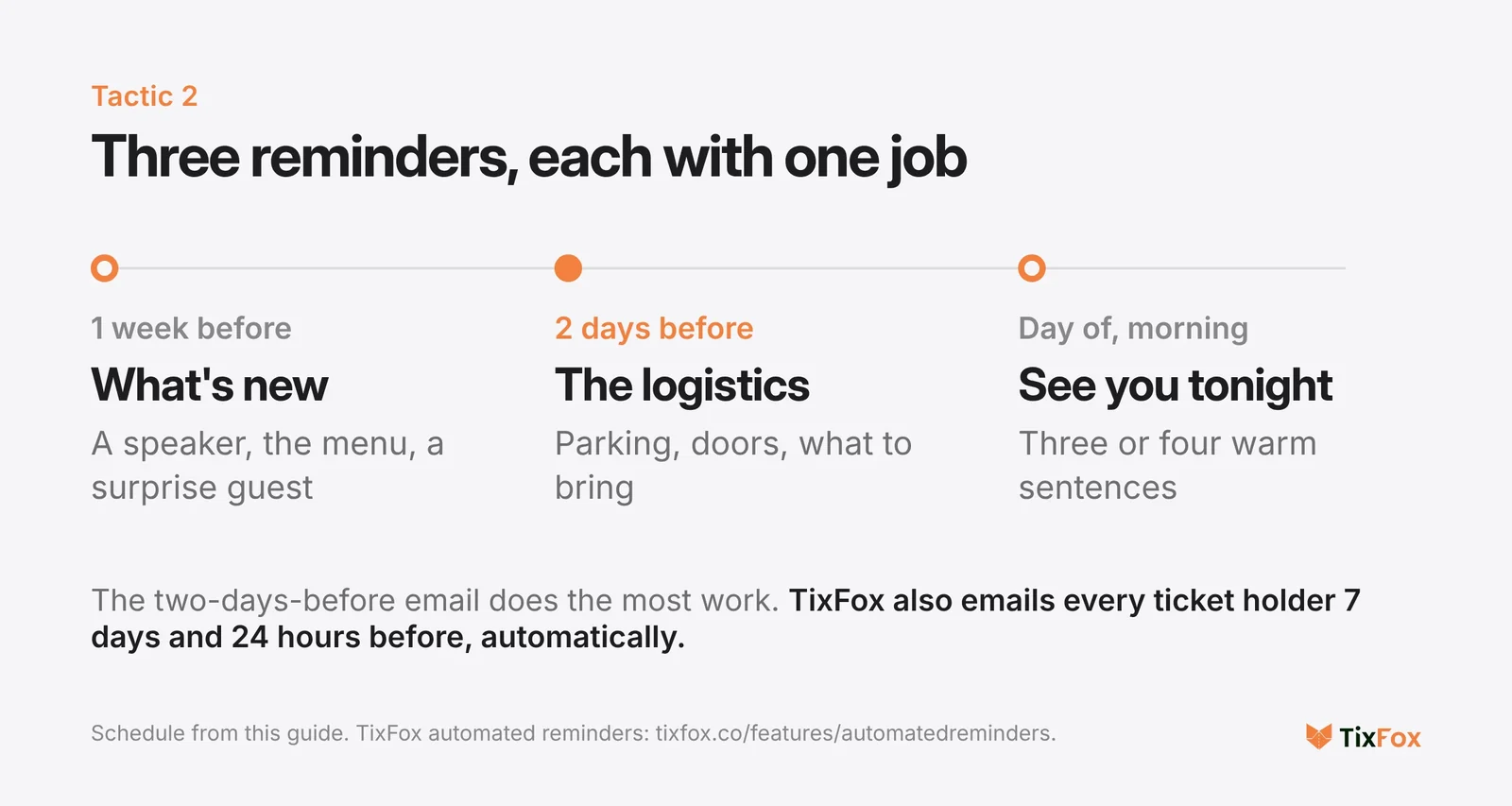
TixFox has an automated reminder feature that covers part of this for you: every ticket holder gets an email 7 days before your event and another 24 hours before, with the event details and a link to their ticket. You don't write or schedule them, so they never get forgotten while you're busy loading chairs into your car. Your own two-days-before logistics email and day-of note go on top.
The key insight most organizers miss: the two-days-before email is the most important one. It's close enough to the event that people are making real plans, and the logistical details you include remove the micro-excuses that cause last-minute dropoffs.
3. Make Canceling Easy (Yes, Really)
This sounds backwards. Why would you make it easier for people to cancel?
Because a cancellation you know about is infinitely more useful than a no-show you discover at the door. When someone cancels 48 hours before the event, you can release that ticket to your waitlist, adjust your catering order, or open the spot to a walk-up buyer. When they just don't show up, you're stuck with an empty seat and a paid-for meal nobody ate.
Add a clear "Can't make it? Let us know" link in every reminder email. Make it one click, no guilt, no explanation required. People avoid canceling because it feels socially awkward. Remove that friction and you'll convert ghost no-shows into usable cancellations.
Some organizers even offer a small incentive: "Cancel by Thursday and we'll give you 50% credit toward our next event." That turns a loss into a future booking.
If you're looking for a platform that handles automated reminders and mobile check-in scanning for $0.39 per ticket, TixFox is free to set up. No monthly fees, no contract.
4. Use a Waitlist to Create Real Demand (and Fill Empty Seats)
A waitlist does two things. First, it fills seats that open up from cancellations, which directly recovers revenue that would have been lost to no-shows. Second, it creates a scarcity signal that makes ticket holders value their spot more.
When your ticket confirmation email says "127 people are on the waitlist for this event," the psychology shifts. That ticket isn't just a purchase anymore. It's something other people want. And that perception makes someone significantly less likely to skip.
For small events (100 to 300 capacity), a waitlist is practical to manage. Cap your online ticket sales at your room capacity. When you sell out, turn on the waitlist. When cancellations come in (and they will, especially if you followed tactic #3), release those tickets to the next person on the list.
5. Front-Load the Value in Your Event Description
Many no-shows happen before the event even approaches. They happen at the moment of registration, when someone signs up on impulse without genuinely intending to attend. Weak event descriptions produce weak commitment.
Compare these two descriptions for the same event:
Vague: "Join us for an evening of networking and learning with local business leaders."
Specific: "You'll hear from three founders who bootstrapped past $1M revenue in 2025. Each will share one specific tactic that worked and one expensive mistake. Doors at 6:30, talks from 7 to 8:15, open bar networking until 9. 120 seats. Last month's event sold out in 4 days."
The second version does three things the first doesn't: it tells the reader exactly what they'll get, it signals scarcity, and it establishes social proof. People who register after reading that description are registering because they actually want to be there, not because "it sounds interesting, maybe."
Specificity at the registration stage reduces no-shows at the attendance stage. If your event page reads like it could describe any event in any city, rewrite it.
6. Send Calendar Invites, Because Confirmation Emails Aren't Enough
A confirmation email lives in an inbox. An inbox gets buried. A calendar invite lives in someone's daily schedule, surrounded by the other commitments they actually show up for.
Include an "Add to Calendar" button (Google Calendar, Outlook, iCal) in every confirmation email. Better yet, attach a .ics calendar file directly. When your event sits alongside "dentist appointment" and "pick up kids at 5," it gets treated with the same level of obligation.
This is a small technical detail that has an outsized impact on attendance. Events that get added to a calendar have meaningfully higher show-up rates than events that exist only as a confirmation email from three weeks ago.
7. Track Your Actual No-Show Rate (Most Organizers Don't)
You can't improve what you don't measure. And most small organizers have no idea what their real no-show rate is, because they aren't tracking check-ins against ticket sales.
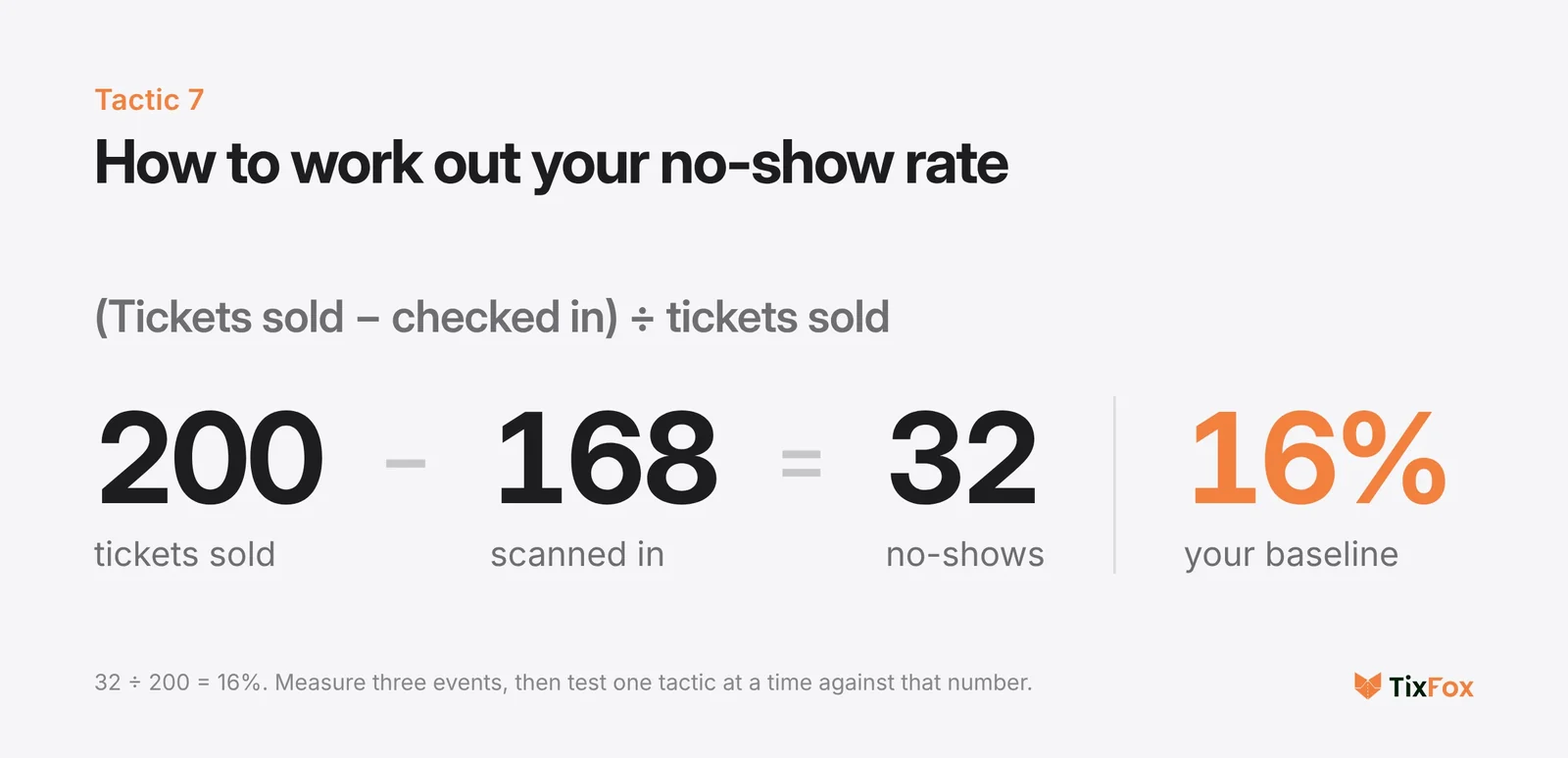
The math is simple: (Tickets sold - Attendees checked in) / Tickets sold = No-show rate.
If you sold 200 tickets and 168 people scanned in at the door, your no-show rate is 16%. That's your baseline. Now you can test tactics against it.
This is where a digital check-in process matters. If your "check-in" is a volunteer with a printed list and a highlighter, you'll get rough numbers at best. A mobile check-in app that scans QR codes gives you an exact, real-time count of who actually walked through the door. After the event, you can see exactly who bought tickets and didn't show, and decide whether to follow up with them.
Here's how QR code tickets and door scanning work in TixFox, start to finish:
Run three events with a check-in scan, and you'll have a baseline no-show rate. Run three more after implementing reminders, and you'll see whether they moved the needle. Without data, you're guessing.
8. Follow Up With No-Shows After the Event
The people who didn't show up aren't lost forever. They paid for a ticket. They were interested enough to register. Something just got in the way.
A short, non-judgmental email the day after the event does two things. It maintains the relationship ("We missed you last night. Hope everything's okay."), and it gives you information about why they didn't come. Was it a scheduling conflict? Did they forget? Was there a logistical issue you could fix for next time?
You can also offer them a credit toward your next event, a recording if one was made, or a summary of what they missed. This converts a no-show into a future attendee rather than a lost customer.
If you follow up with no-shows consistently, you'll notice patterns. Maybe your Tuesday events have higher no-shows than your Saturdays. Maybe events with a 7pm start lose more people than events starting at 6:30. These patterns are invisible unless you look for them, and they'll inform decisions about scheduling, pricing, and communication that lower your no-show rate across the board.
Putting It All Together: A No-Show Reduction Checklist
Here's the short version you can screenshot and use before your next event.
Before ticket sales go live: Write a specific, vivid event description. Set your capacity and enable a waitlist once sold out. Price your tickets at something above $0, even if it's nominal.
After someone buys a ticket: Send a confirmation email with an "Add to Calendar" button. Include a "Can't make it?" cancellation link.
One week before: Send a content-driven reminder with new information about the event.
Two days before: Send a logistics email with parking, directions, and what to expect.
Day of: Send a short, warm "see you tonight" message.
At the door: Use a scanning app to track exactly who showed up.
Day after: Email no-shows with a friendly follow-up and a credit toward the next event.
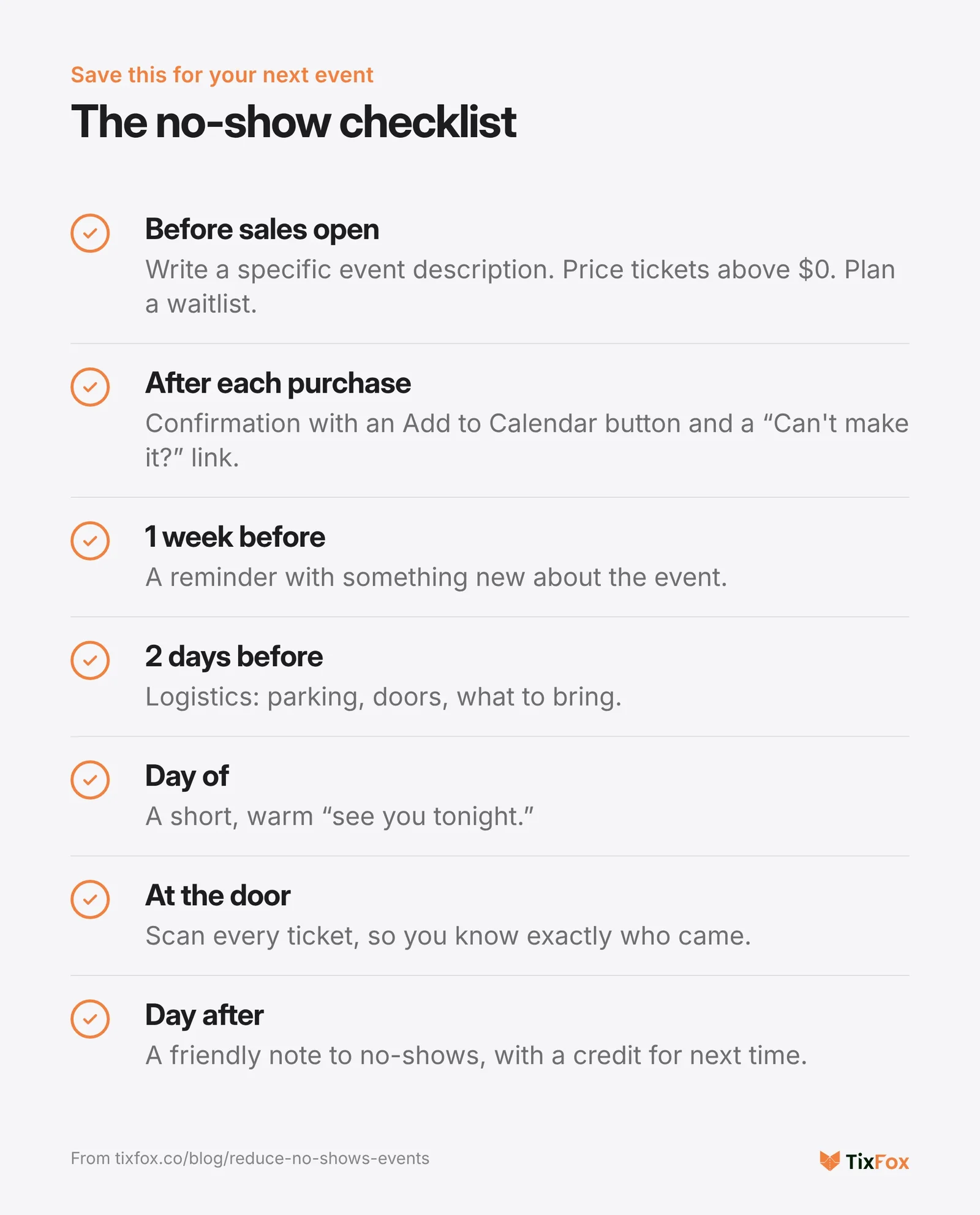
Most organizers implement one or two of these. Implementing all of them is what takes a 25% no-show rate down to 10% or less.
Frequently Asked Questions
What's a normal no-show rate for small events? Across more than 1,070 events in PheedLoop's data, the median no-show rate is about 17% for paid events and 28% for free ones. Events expecting 150 or more people settle around 19%, while events of 10 to 49 lose about 32%. If your paid event is seeing no-shows above 20%, there's likely a communication or pricing issue that these tactics can address.
Do automated reminders actually reduce no-shows? Yes, and the data is consistent across event types. Well-timed reminders (one week, two days, and day-of) typically reduce no-shows by 20% to 30% compared to events with no reminders beyond the initial confirmation email. The two-days-before reminder tends to have the highest impact because it catches people during active planning.
Should I overbook my event to account for no-shows? It depends on your risk tolerance and your event type. If your historical no-show rate is 15%, selling 10% to 12% over capacity is reasonable for events where exceeding capacity slightly won't cause problems (standing-room events, outdoor festivals). For seated dinners or events with strict fire code limits, a waitlist is safer than overbooking.
What's the best way to handle no-shows at free events? The most effective strategy is adding a nominal ticket price, even $3 to $5, which typically cuts free-event no-shows in half. If the event must stay free, use a refundable deposit model or require pre-event confirmation (a "click to confirm" email 48 hours before). Both create micro-commitments that improve show-up rates.
How do I track check-ins without expensive software? A free mobile check-in app on your phone is all you need. TixFox includes a free scanning app that scans ticket QR codes and gives you a real-time count of who's arrived. It works on any smartphone, and you can hand it to a volunteer with zero training. After the event, you have an exact attendance record to compare against tickets sold.
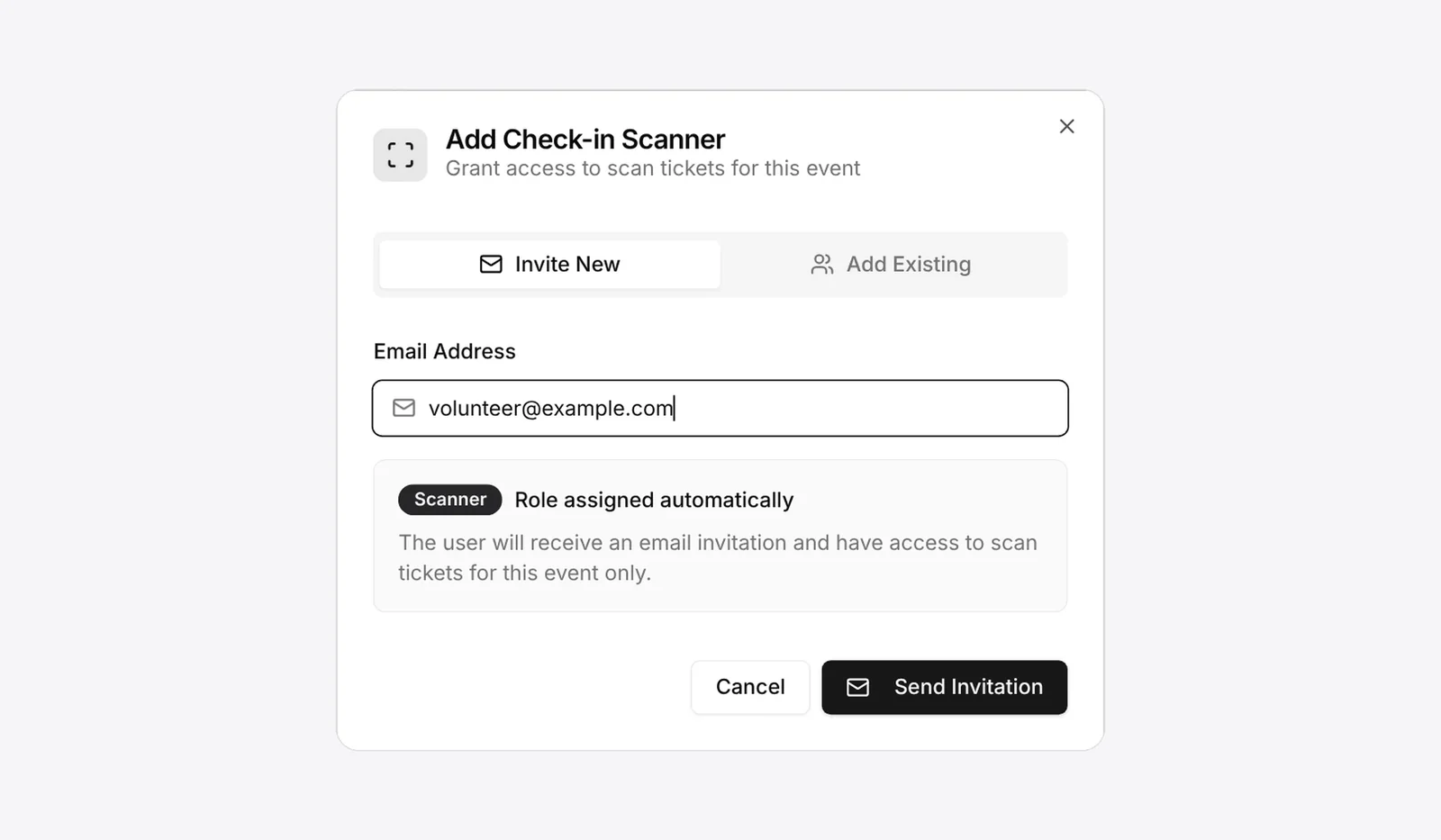
Adding a volunteer as a scanner in TixFox. They can check people in for that one event, without seeing your sales or payouts.
Fewer no-shows means more full rooms, less wasted spend, and better events. If you're looking for a ticketing platform that includes automated reminders and mobile check-in scanning at $0.39 per ticket, TixFox is free to try. Set up your next event in 10 minutes and start measuring what actually works.
Keep more of every ticket sale.
- 39¢ per ticket, $0 on free events
- No monthly fee, no contract
- Get paid as each sale comes in