How to sell pay-what-you-can tickets
Last updated at: Oct 20, 2026A pay-what-you-can ticket lets each buyer choose their price, as long as it's at least the minimum you set. To create one, open your event, go to Ticket Types, click Create Ticket, set Pricing Type to Pay what you can and enter a Min Payment Amount.
Create a pay-what-you-can ticket
- Open your event and go to Ticket Types.
- Click Create Ticket, or open the menu next to an existing ticket and choose Edit Ticket.
- Give it a name under Ticket Type, for example "Pay what you can" or "Supporter".
- Set Pricing Type to Pay what you can.
- Enter the Min Payment Amount. Buyers can't pay less than this, but they can pay more.
- Set the Quantity and Max Tickets Per Order.
- Click Create Ticket Type.
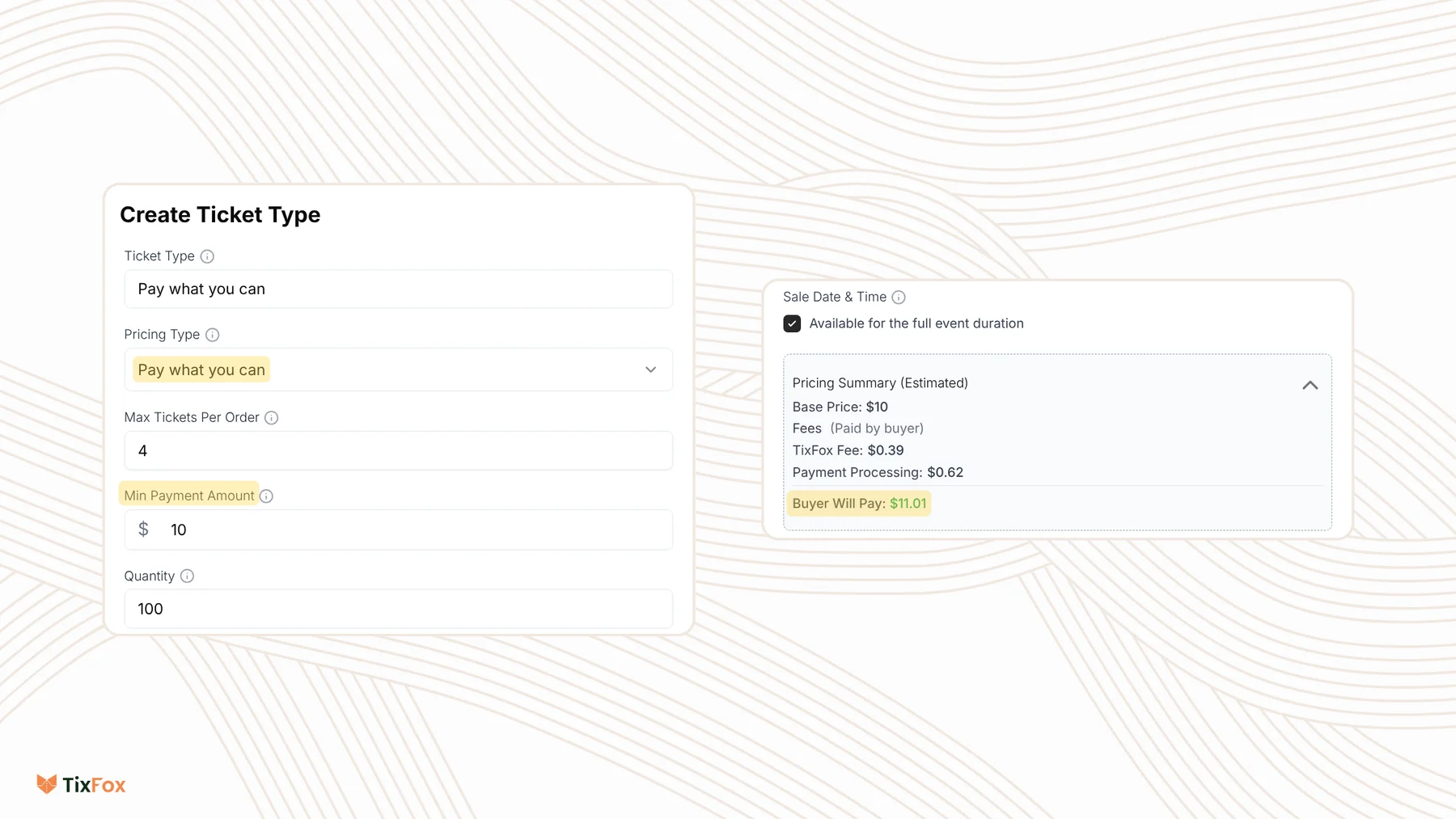
The Pricing Summary (Estimated) shows the fees for someone who pays the minimum. To choose whether you or your buyers cover the fees, use Handle Fees under Show Advanced Settings. See How to pass ticket fees to buyers or absorb them.
What buyers see
At checkout, the ticket shows Pay what you can with the note "Enter any amount above" your minimum. The amount box starts at the minimum. Buyers can type their own amount or tap one of the quick buttons with higher amounts.
Tips for setting the minimum
- Set the minimum to what you need to cover your costs per person, so every sale pays its way.
- Explain the idea in the ticket's Description, for example "Pay what feels right. The suggested price is $25."
- Offer a fixed-price ticket next to it if you want a clear standard price. Each ticket type has its own Pricing Type.
Common questions
Can buyers pay less than the minimum?
No. The Min Payment Amount is the lowest price a buyer can pay for that ticket.
Can I use pay what you can for add-ons?
Yes. When you create an add-on, set its Pricing Type to Pay what you can. See How to sell add-ons.
Can I change a fixed-price ticket to pay what you can?
Yes. Open the menu next to the ticket, choose Edit Ticket and change the Pricing Type.
Can I limit how many pay-what-you-can tickets I sell?
Yes. Set the Quantity on that ticket type. When they're gone, buyers can still choose your other tickets.