
Eight hours before a sold-out kids' event, an organizer got an email from a parent. Her kids were sick. Could she get a refund? The ticket said non-refundable, the food was already paid for, and there was no time left to resell the spots. The organizer asked r/EventProduction what to do. Most replies said to hold the line. "Let the policy be the bad guy," one wrote. Another wouldn't refund but would "allow her to use as a credit for a future event."
A refund policy settles the awkward conversations before they happen, so you're not making it up at 11 a.m. on show day with your phone buzzing.
The short answer: a good event refund policy answers five questions on your event page, before anyone pays:
- Can buyers get their money back, and until when?
- What happens if you cancel or postpone?
- Are any fees or add-ons excluded?
- How do they ask, and how long does the money take?
- If no refund, what can they do instead (transfer, credit)?
Start with a template below, add the cancellation lines that fit your event, and check the fee math before you promise full refunds.
Event refund policy vs. cancellation policy
An event refund policy says when a ticket buyer can get their money back if they can't come. An event cancellation policy says what you'll do if the event changes: cancelled, postponed, moved or missing its headliner. Most small events need both, and they fit in one short paragraph on the event page.
To buyers, it all feels like one promise. "Full refunds until November 7" means nothing if your page doesn't also say what happens when the rain date moves to a Sunday they can't make.
Pick the right refund policy for your event
Pick your policy based on one question: if someone drops out, can you fill or cut their spot?
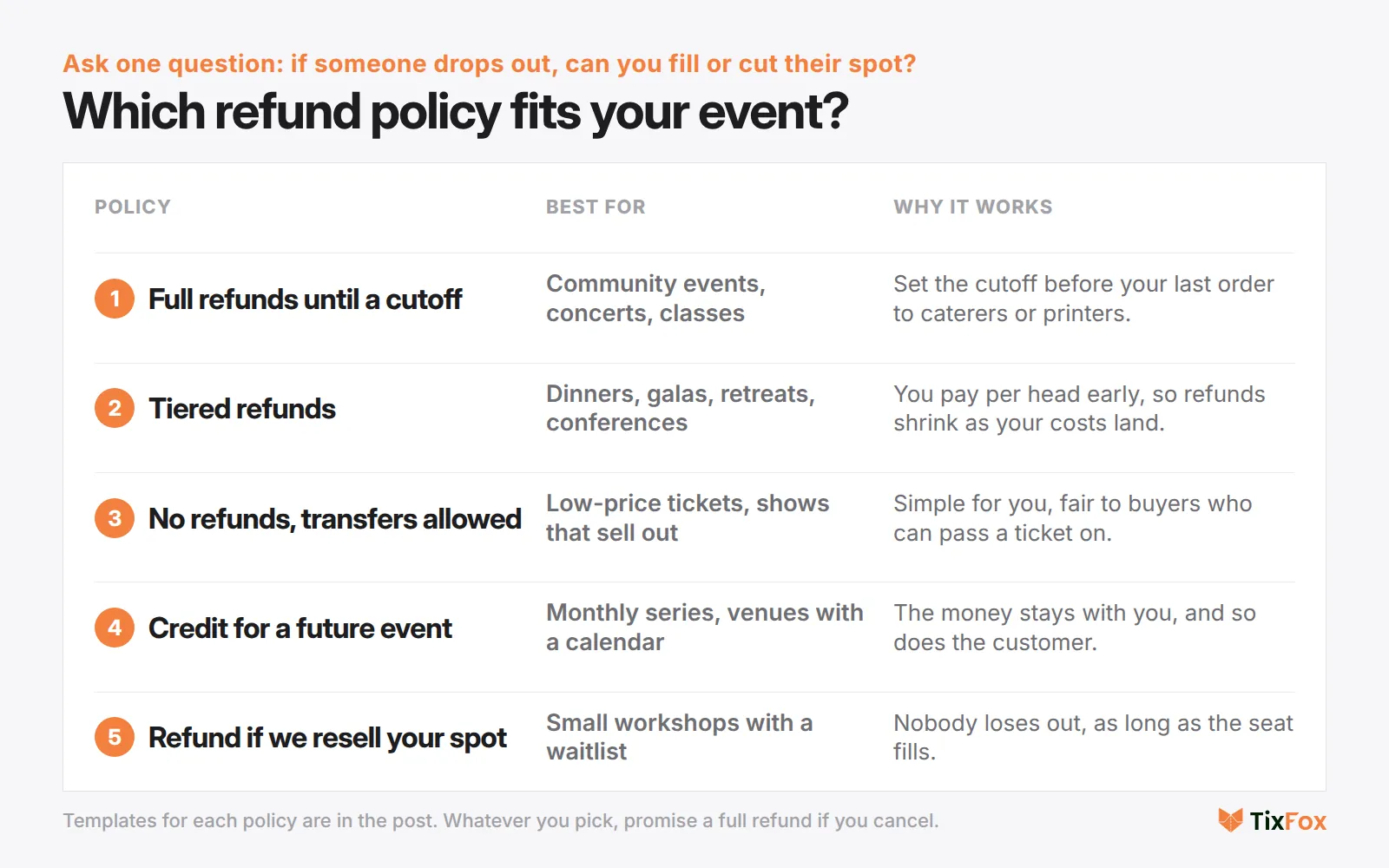
- Full refunds until a cutoff. Useful for community events, concerts and classes where you can still fill the spot. Pick a cutoff that comes before your last order to caterers or printers, so a late drop-out doesn't cost you money you've already spent.
- Tiered refunds. For dinners, galas, retreats and conferences where you pay per head well in advance. Buyers get less back the closer it gets.
- No refunds, transfers allowed. Works best for cheap tickets or sold-out events, if buyers can easily pass a ticket on.
- Credit only. Works for a monthly series or a venue with a calendar.
- Refund if we can resell your spot. Good for small workshops with a waitlist. One commenter in that Reddit thread suggested exactly this when there's a waiting list.
The hard part is resisting one-off exceptions. The organizer in that thread put it plainly: "My concern is she tells people and then ppl think future events are refundable."
Event refund policy templates you can copy
Swap the bracketed parts for your own details. Keep it short enough to paste onto your event page.
Full refunds until a cutoff
Full refunds up to [7] days before the event ([date]). After that, tickets can't be refunded, but you can give yours to a friend. If we cancel, you'll get a full refund without having to ask.
Tiered refunds
Cancel 30 or more days before the event for a full refund. Cancel 14 to 29 days before for a 50% refund. Within 14 days, we can't refund your ticket because we've already paid for your place, but you can transfer it to someone else. If we cancel, everyone gets a full refund.
No refunds, transfers allowed
All ticket sales are final. Can't make it? Forward your ticket email to a friend. Your QR code works for whoever brings it, once. If we cancel, you'll get a full refund.
Credit for a future event
We don't offer cash refunds, but if you tell us at least [48 hours] before the event, we'll give you a credit for the full ticket price to use at any of our future events. If we cancel, you can choose a full refund or the credit.
Refund if we can resell your spot
This [workshop] has [12] seats and a waitlist. If you can't come, email us at [email] and we'll offer your seat to the waitlist. If someone takes it, we'll refund you in full. If we cancel, you'll get a full refund.
Free events
A free event doesn't need a refund policy, but it does need a cancellation line, because people still plan their evening around you. One sentence is enough: "If we have to cancel, we'll email everyone who registered at least [24 hours] ahead."
Event cancellation policy: what to promise if things change
Also say what happens if you cancel or move the event. Add whichever lines apply below your refund policy.
If we cancel:
If we cancel the event, you'll get a full refund, including any fees, to the card you paid with. We'll start refunds within [5] business days of the announcement.
If we postpone:
If we move the event to a new date, your ticket is valid for the new date. If you can't make it, ask for a full refund within [14] days of the announcement.
Weather (outdoor events):
This event goes ahead in light rain. If we postpone because of severe weather, the postponement terms above apply. Rain dates will be posted by [12 p.m.] on the day.
Headliner or lineup changes:
Lineups can change. If a headliner pulls out, we'll let you know and offer refunds to anyone who asks within [7] days.
Add-ons:
Add-ons such as drink vouchers and merch are refundable only if the event is cancelled.
Decide the weather call time in advance and stick to it. One organizer postponed their first big event with 12 hours' notice after a heavy forecast, then watched it clear: "stopped raining not long after I posted a rain date, not another drip all weekend." (r/EventProduction) A call time you've published takes the guesswork out of it, for you and your buyers.
What a refund actually costs you
Refunds can still cost you money, because the fees on the sale don't come back.
On TixFox, refunds run through your own connected Stripe account, and the TixFox FAQ says platform fees are non-refundable once a ticket has been sold. Stripe's own refund documentation says the same about card processing: "Stripe's processing fees from the original transaction aren't returned."
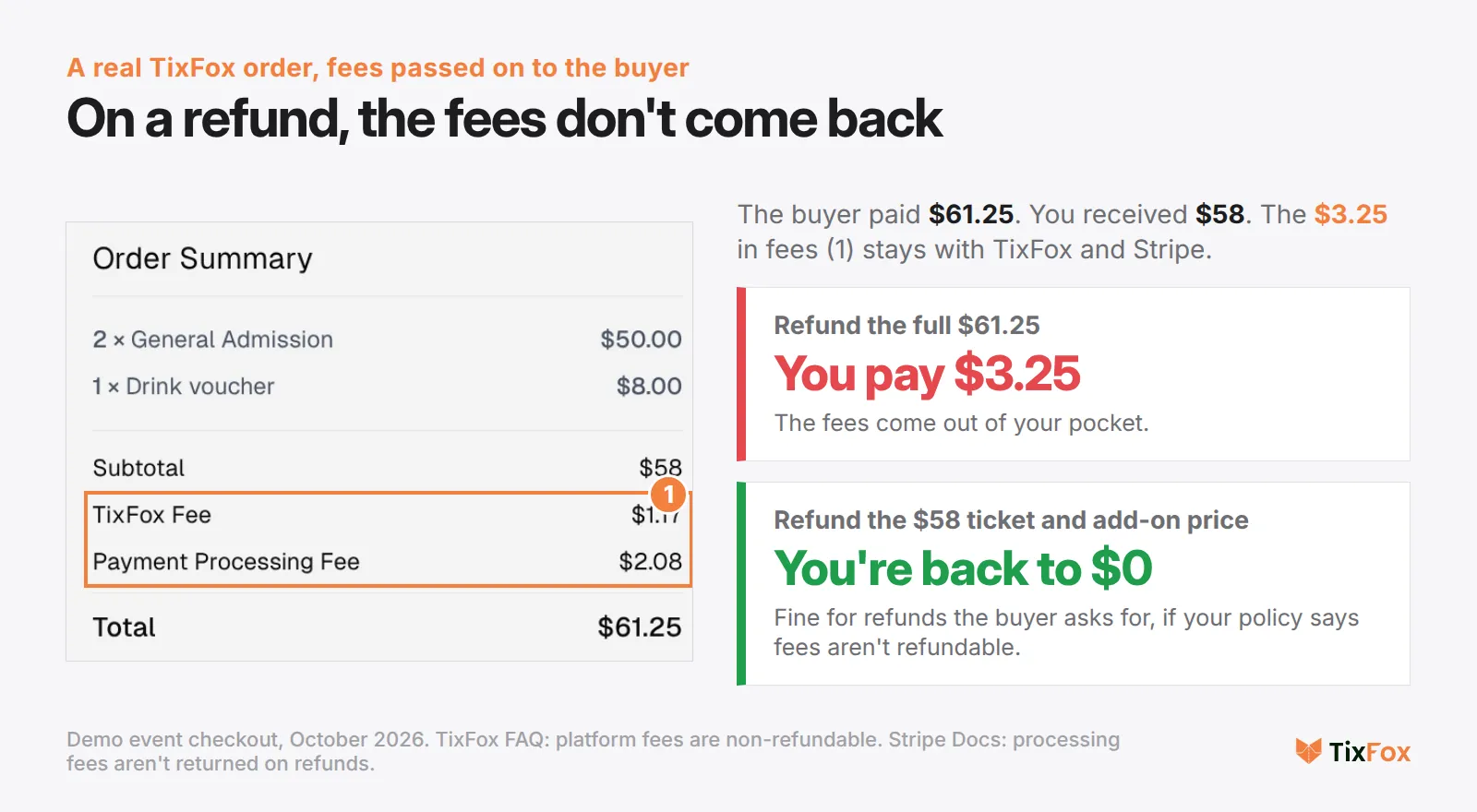
Here's a demo order with fees passed on to the buyer. The buyer paid $61.25. You received $58. The other $3.25 went to fees:
- Refund the full $61.25 and the $3.25 in fees comes out of your pocket.
- Refund the $58 ticket and add-on price and you're back where you started.
So for refunds the buyer asks for, it's fair to say up front that fees aren't refundable. Stripe lets you refund any amount up to the original charge, so a partial refund is easy. When you cancel, refund everything, fees included. You made the call, so the cost should be yours.
Two other practical details from Stripe. Refunds come out of your available Stripe balance, so don't pay yourself out the night before a refund wave. And the money can only go back to the card the buyer used, where it usually shows up in 5 to 10 business days. Put that number in your reply so people stop emailing to ask where it is.
If you cancel and don't refund: chargebacks
A "no refunds" line doesn't stop the buyer's bank when the event doesn't happen.
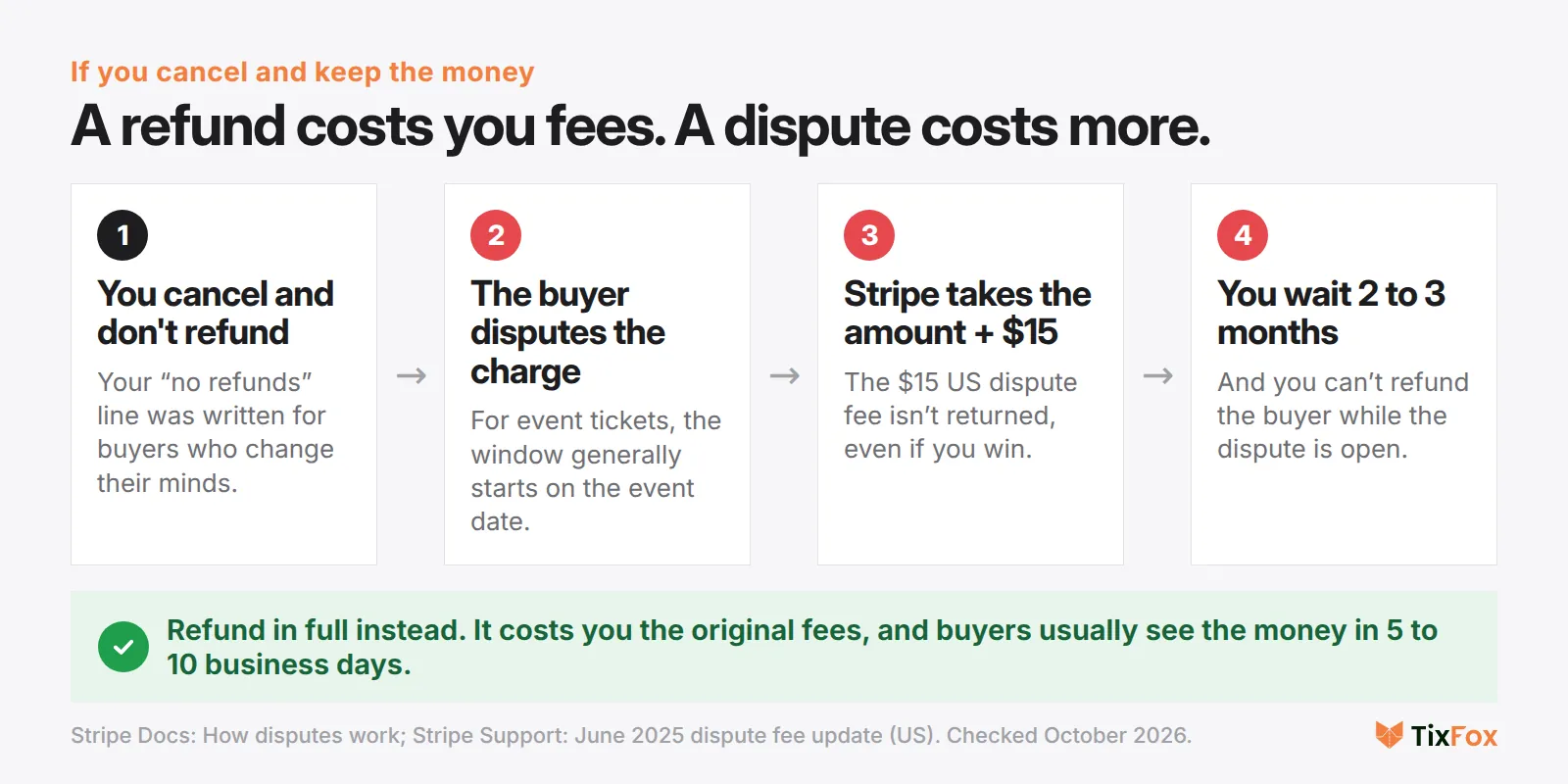
A buyer who paid for an event that never took place can dispute the charge with their card issuer. Stripe's dispute categories cover exactly this: "product not received" and "credit not processed" claims, for things a customer paid for but didn't get or was due a refund on. Here's what happens when one comes in, according to Stripe's documentation:
- Stripe takes the disputed amount plus a dispute fee from your balance. In the US the fee is $15, and you don't get it back even if you win.
- You can't issue a refund outside the dispute process while the dispute is open.
- For an event ticket, the dispute window generally starts on the event date, not the purchase date. Buyers can dispute well after the night you cancelled.
Stripe's advice for preventing these is to have a clear cancellation policy "that's easy to find or explicitly disclosed to the customer prior to purchase," and it notes that for event tickets, evidence of a cancellation policy "can be material." That helps when a buyer disputes a refund your policy never promised. It's unlikely to help when the event didn't happen at all. For a cancelled event, refunding quickly and in full is usually the cleanest path.
Where buyers should see your refund policy
Put the policy where buyers see it before checkout. In TixFox: open your event, go to Checkout Settings, choose Refund Policy, paste your text and save.
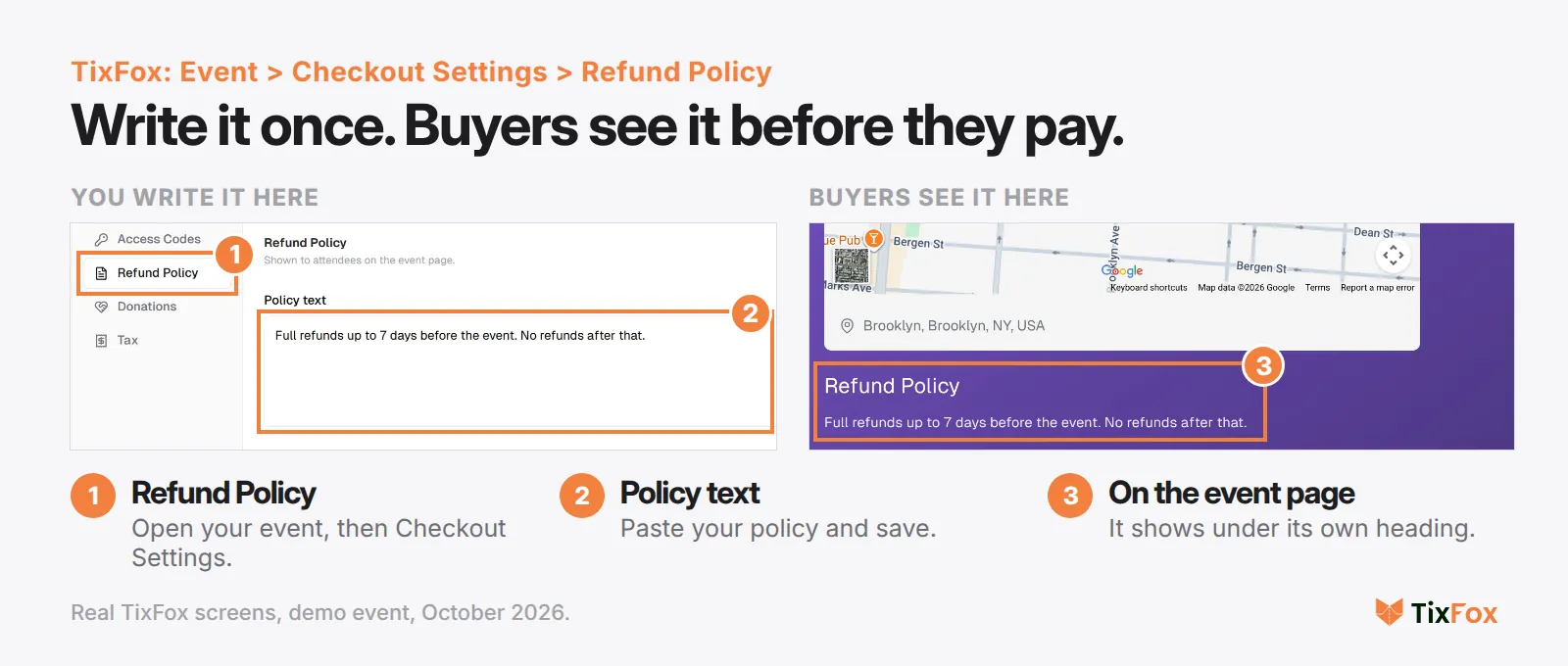
It then appears under its own Refund Policy heading on your event page, right below the location, on the same page as the Get Tickets button. Repeat it in these places too:
- Your website's FAQ, if you link to the event from there.
- The reminder email before your cutoff date ("Last day for refunds is Friday"). It cuts last-minute requests and gives people who can't come a chance to pass their ticket on. Our event email marketing guide covers when to send it.
- Your event page checklist. We include it in the list of things every event page needs, along with the date, place and full price.
How to answer a refund request
When a request comes in, answer quickly and stick to your policy. Use one of these.
When they qualify:
Hi [name], no problem. I've refunded [amount] to the card you paid with. Your bank usually shows it within 5 to 10 business days. Hope to see you at the next one.
When they don't, but you can offer something:
Hi [name], I'm sorry to hear that. Our refund window closed on [date], so I can't refund the ticket, but you're welcome to pass it to a friend. Just forward your ticket email. If that doesn't work, I can give you a credit for our [next event].
When they don't, and the answer is no:
Hi [name], I'm sorry you can't make it. Tickets became non-refundable on [date], as listed on the event page, because we'd already paid for food and staff by then. You can still give your ticket to someone else by forwarding your ticket email.
If you have a waitlist, you have one more option: offer their spot to the next person and refund them if it sells.
Legal basics to check
This isn't legal advice, and the rules depend on where you sell. For most small events, watch these two points:
- There's no automatic 14-day cooling-off period for dated event tickets in the UK or EU. The UK Consumer Contracts Regulations 2013 (regulation 28(1)(h)) and the EU Consumer Rights Directive (article 16(l)) both exclude "services related to leisure activities" when the contract is for a specific date. That covers the buyer changing their mind. It doesn't cover an event you cancel.
- Everywhere else, check your local consumer rules, especially if you sell to buyers in another country. When in doubt, refunding a cancelled event in full is usually the cleaner call.
Set your policy before tickets go on sale: on TixFox, your refund policy lives in Checkout Settings and shows on every event page you publish. Create your event free. Free events cost $0, and paid tickets are 39¢ each (30¢ under $5) plus card processing.
FAQ
Do I have to offer refunds for my event?
Usually not for a buyer who changes their mind, as long as your policy says so before they buy, but check the rules where you sell. If you cancel, plan to refund. Buyers can dispute the charge with their bank, which costs you more than the refund.
Can I keep the ticket fees when I refund?
You can say fees are non-refundable for refunds the buyer asks for, and refund just the ticket price. Say so in your policy. When you cancel, refund the full amount. TixFox and Stripe keep their fees either way, so refunding the fees comes out of your pocket.
How long do event refunds take?
On Stripe, the buyer usually sees the refund 5 to 10 business days after you issue it, depending on their bank. A refund issued shortly after the purchase can show up as the charge simply disappearing instead.
Can I give a partial refund?
Yes. Stripe lets you refund any amount up to the original charge, and you can issue more than one partial refund on the same payment.
What should my refund policy say about bad weather?
Say whether the event runs in rain, when you'll make the call, and that a weather postponement follows your postponement terms. A common approach is to keep tickets valid for the rain date and offer refunds to anyone who can't make it.
Do I need a refund policy for a free event?
No refund policy, but add one line about cancellation and how you'll tell people. If no-shows are your bigger worry with free events, read our guide to reducing no-shows.
Planning your next event? Create your event free, see pricing, or read how to price your tickets so your refund cutoff matches when your costs land.
Sources
- TixFox FAQ: refunds, cancellations and fees. tixfox.co/faq. Checked October 2026.
- Stripe Docs: Refund and cancel payments. docs.stripe.com/refunds
- Stripe Docs: How disputes work. docs.stripe.com/disputes/how-disputes-work
- Stripe Docs: Dispute reason code categories. docs.stripe.com/disputes/categories
- Stripe Support: June 2025 pricing updates for disputes. support.stripe.com
- The Consumer Contracts (Information, Cancellation and Additional Charges) Regulations 2013, regulation 28. legislation.gov.uk
- Directive 2011/83/EU on consumer rights, article 16. eur-lex.europa.eu
- Organizer posts on Reddit: r/EventProduction (July 2024, July 2026), linked where quoted.
- Screens: TixFox dashboard, event page and checkout, demo event, October 2026.