New guide, October 2026: a video walkthrough, how the night actually runs, and how to set up the tickets so both sides fill evenly. Checked October 15, 2026.
Quick answer
To host a speed dating event, pick an age bracket and a venue, then sell one ticket type per side with its own cap, for example 12 women and 12 men at the same price. Ask each guest's age at checkout, run 3 to 8 minute dates where one side stays seated and the other moves on the bell, collect yes or no score cards, and email every mutual match the next day.
- Size: 10 to 14 people per side. Twelve per side gives everyone twelve first dates.
- Format: 5 minute dates plus a minute to switch. Twelve dates take about 70 minutes, plus a short break.
- Balance: one ticket type per side, each with its own cap, so one side can sell out while the other stays on sale.
- Matches: a match is two yeses. Email both people the other's email the day after.
- Cost on TixFox: 39¢ a ticket plus Stripe's 2.9% + 30¢. On a $35 ticket the guest pays $36.76 and you keep $35.
It's 7:10. The first date was supposed to start at 7:00, and you've got fourteen women and nine men. For the next hour, five women sit out every single round, and they paid the same as everyone else. If you host speed dating, you know the ratio is the whole night.
One host who ran 30 of these nights in Austin put it plainly: "A slight variance of one or two people was generally ok ... but anything beyond that negatively impacted the experience." This guide shows how to run the night, and how to set up the tickets so it sells out balanced in the first place.
Watch: host a speed dating night, start to finish
The video covers how the night works at 0:49, creates the event at 1:35, sets up one ticket type per side at 2:16, adds the age question at 3:07, tracks the ads at 3:24, and shows what guests see at 4:14.
How a speed dating night works
Before any settings, here's the format the tickets have to fit.
Ten to fourteen people per side is a good size. The Austin host aimed for 10 women and 10 men and found that "Events significantly larger than that left people feeling overwhelmed." Much smaller, and there isn't much chance of a match. Listings in Boston and Saratoga run 13 or 14 dates a night.
One side stays seated at numbered tables, and the other side moves one table every time you ring the bell. A New York host who ran these nights described the bell bluntly: they'd ring "a giant metal bell (seriously!)" and shout "ROTATE!"
Each date runs three to eight minutes. That's the range Eventbrite's own guide calls normal. Five is a good place to start: long enough to get past "what do you do," short enough that a dud date doesn't drag.
Everyone gets a score card. After each date, guests mark yes or no next to that person's number. A match is when both people said yes, and you email each match the other person's email the next day. No app needed.
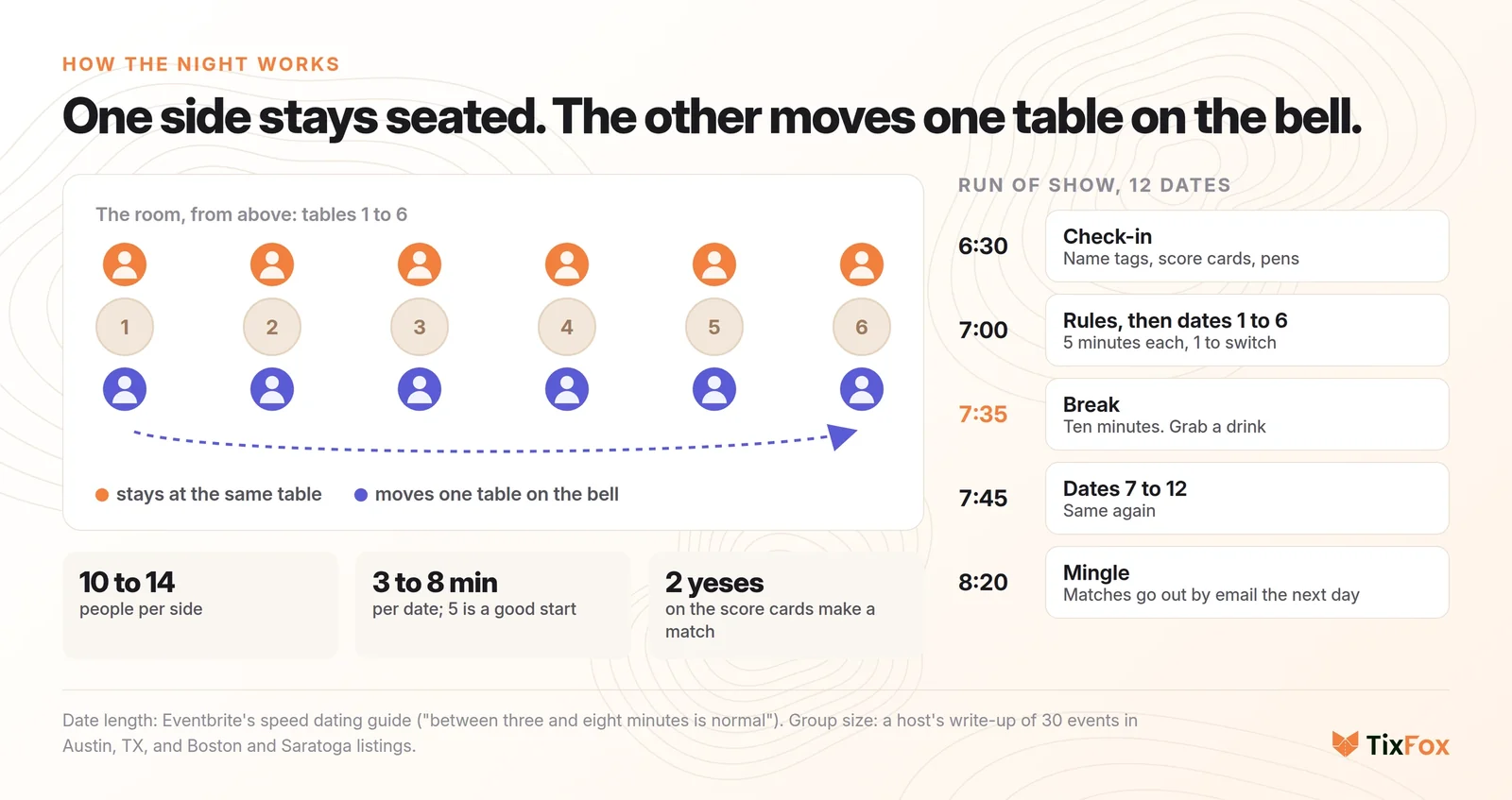
Here's a run of show for twelve dates of five minutes, with a minute to switch:
- 6:30 Check-in. Name tags, score cards and pens.
- 7:00 Rules, then dates 1 to 6.
- 7:35 A ten minute break. Everyone grabs a drink.
- 7:45 Dates 7 to 12.
- 8:20 Mingle. The bar stays open.
How to host a speed dating event, step by step
You need a venue, an age bracket and a free TixFox account. The steps below use a real demo night: First Round Speed Dating, singles in their 30s and 40s, twelve women and twelve men at a wine bar.
Step 1: Book the venue and pick your bracket
A cocktail bar, wine bar, brewery or coffee shop with enough two-person tables works. You may not have to pay for the room. The Austin host found that "Venues were happy to host for no charge, as events brought them ~20 customers who would typically purchase 2-3 drinks each."
Then pick the bracket, because the bracket is what people search for: "speed dating 30s and 40s", "over 40", "20s". Put it in the event title. In TixFox, click Create Event, add the title, the date and time, the venue and an image, and connect Stripe so ticket money goes straight to you.
In the description, answer what everyone asks: what happens, how long it takes, and how the matches work. Then add the one line real hosts put on their listings: buy the ticket for your side, and if your side is sold out, please don't buy the other one. A Boston listing says it in capitals: "if your ticket type is sold out, please DO NOT BUY THE OTHER TICKET."
Step 2: Make one ticket type per side
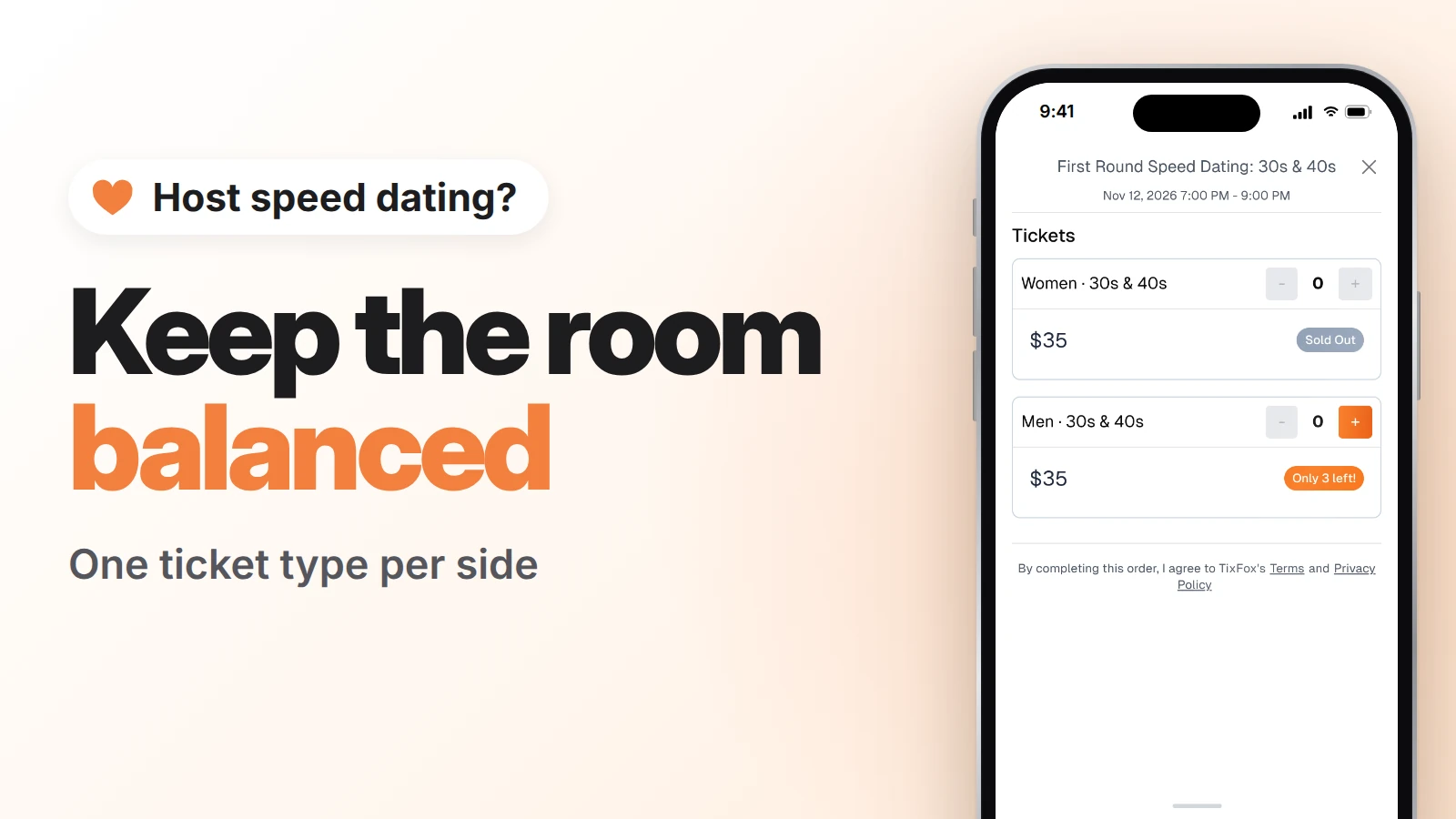
This is the setting that keeps the room balanced. Don't sell one ticket for everyone. Make one ticket type for each side, each with its own cap.
- In your event, click Create Ticket Type. Name it Women · 30s & 40s.
- Set Max Tickets Per Order to 1. Every guest then checks out with their own name and email, which you'll need for the matches. On a two-ticket order, both tickets carry the buyer's name and email, so the friend's email never reaches you.
- Set the price to $35 and the quantity to 12.
- Under Show Advanced Settings, turn on Show Remaining Count at 3 or fewer. Guests then see "Only 3 left!" when that side is nearly gone.
- Do the same for Men · 30s & 40s: $35 and 12 tickets.
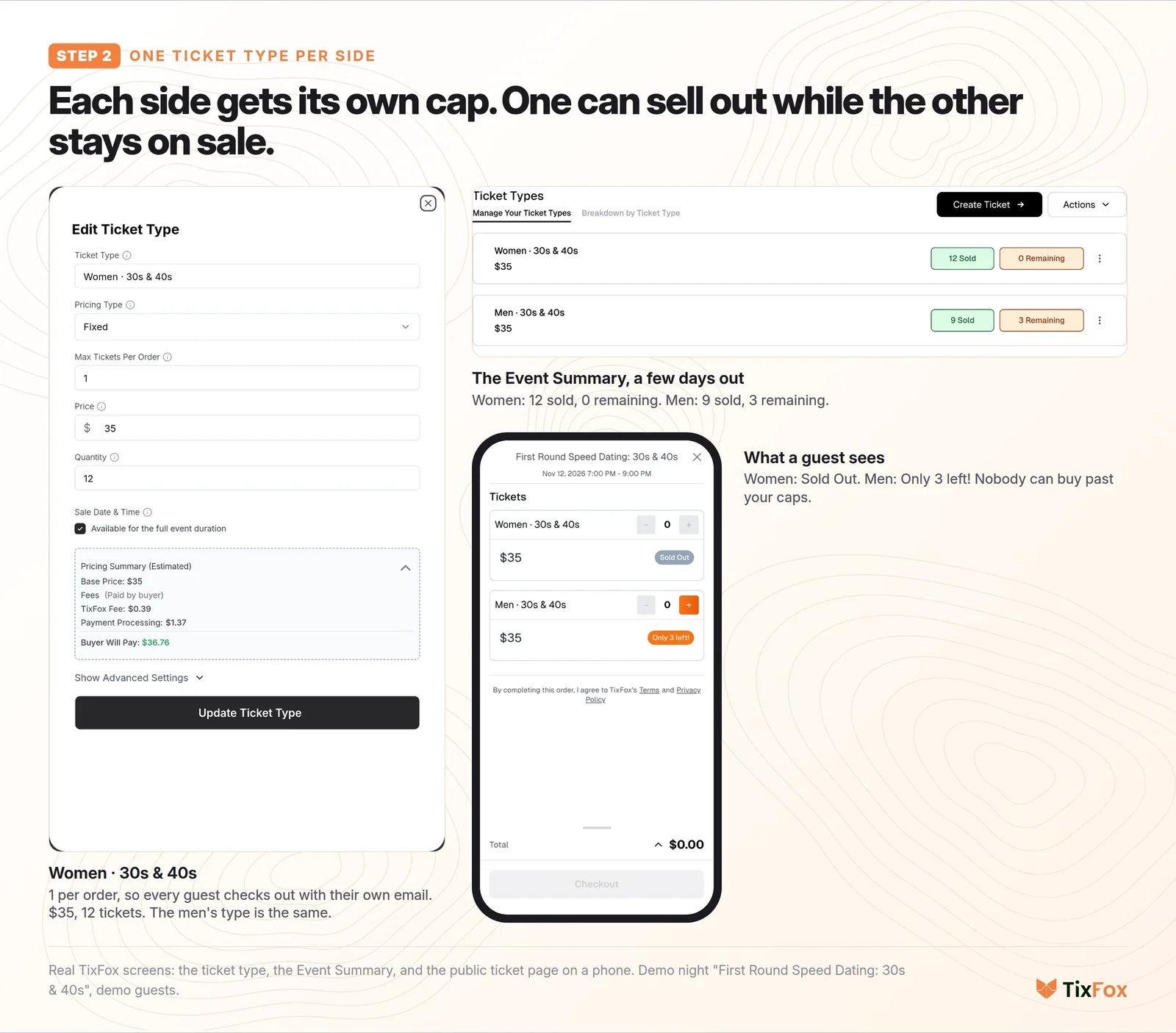
Now, when one side hits twelve, it sells out for that side only, and the other side stays on sale. Nobody can buy past your caps.
Keep the price the same for both sides. Some hosts charge one side more, or give one side free tickets. In some states that's a legal problem: in California, sex-based price discounts are illegal under the Unruh Civil Rights Act (Koire v. Metro Car Wash, 1985, and Civil Code 51.6). Balance the room with the caps, not the price. This isn't legal advice, so check your own state.
Set up your first night: create a free TixFox account, make one ticket type per side, and share one link. Free to set up, 39¢ a ticket.
Step 3: Ask every guest's age
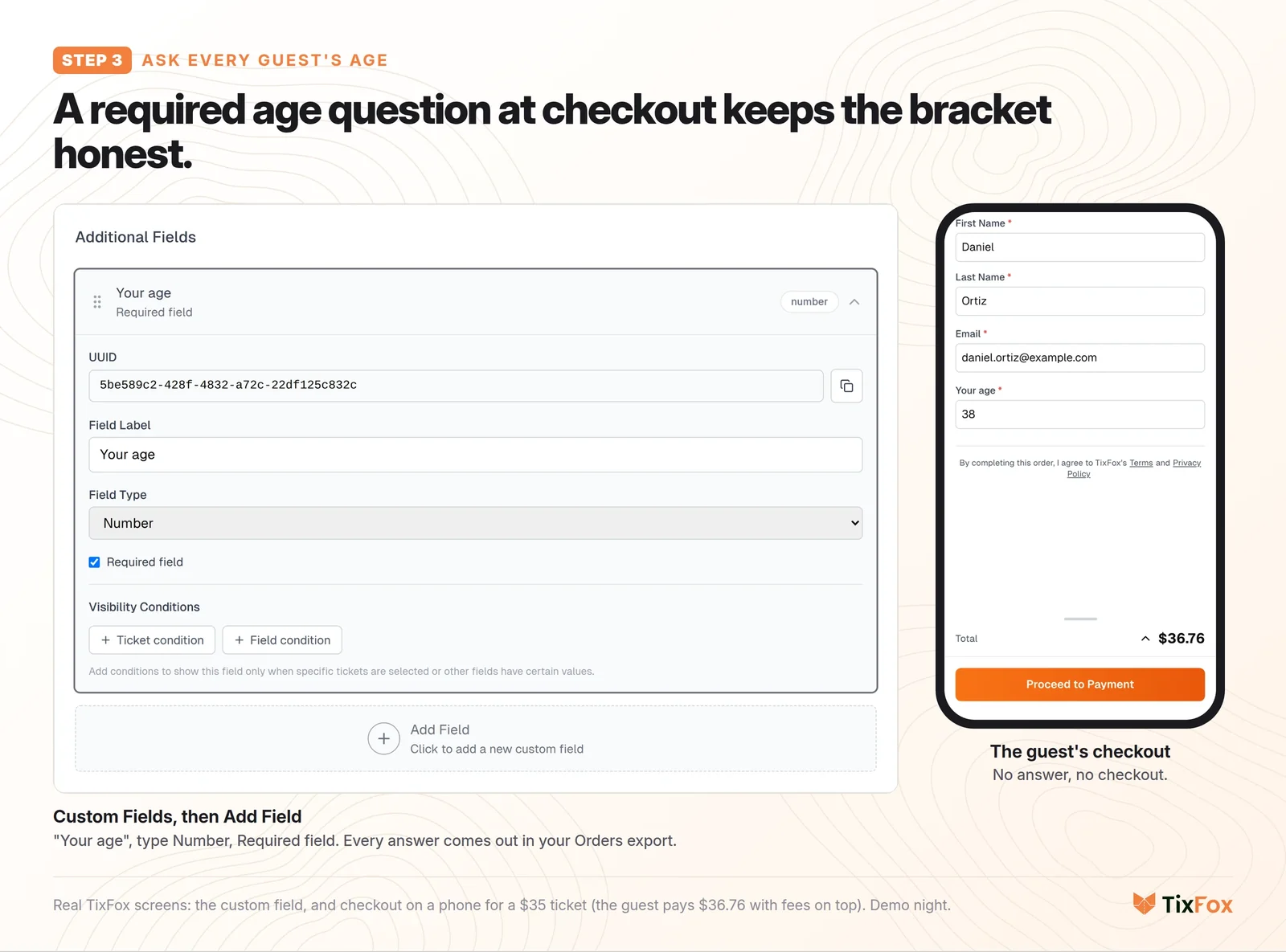
Your age bracket is a promise to everyone in the room. So ask at checkout.
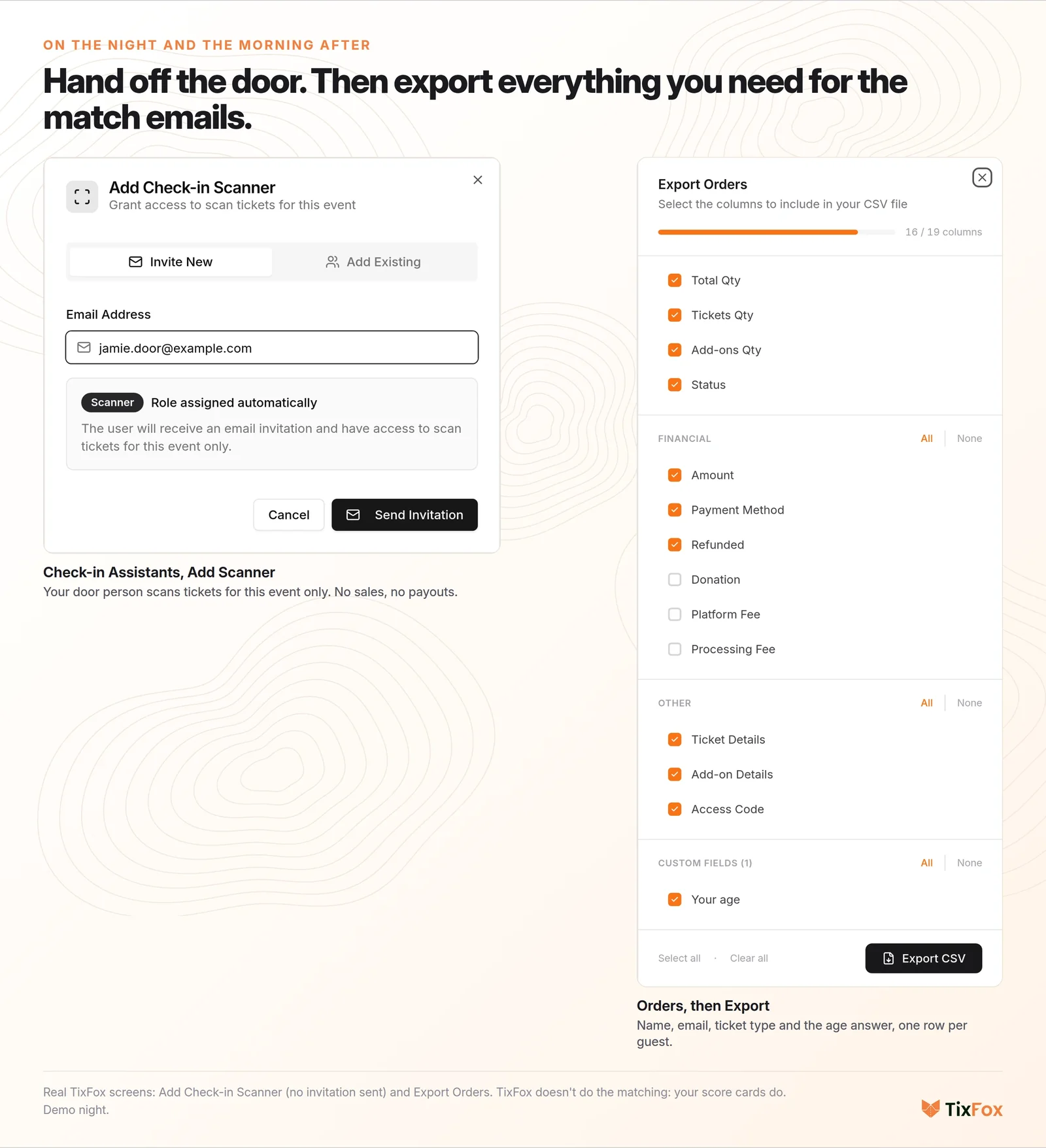
Open Custom Fields in your event and click Add Field. Call it Your age, set the type to Number, and tick Required field. A guest can't finish checkout without answering, and every answer comes out in your Orders export next to their name, email and ticket. More on custom checkout questions.
Step 4: Fill the seats with ads you can measure
A lot of hosts fill seats with Instagram and Facebook ads, and that's where the money goes. The Austin host reported average costs of $717 per event, "~90% in advertising", and "17% of events were profitable." So you need to know which ad actually sells tickets.
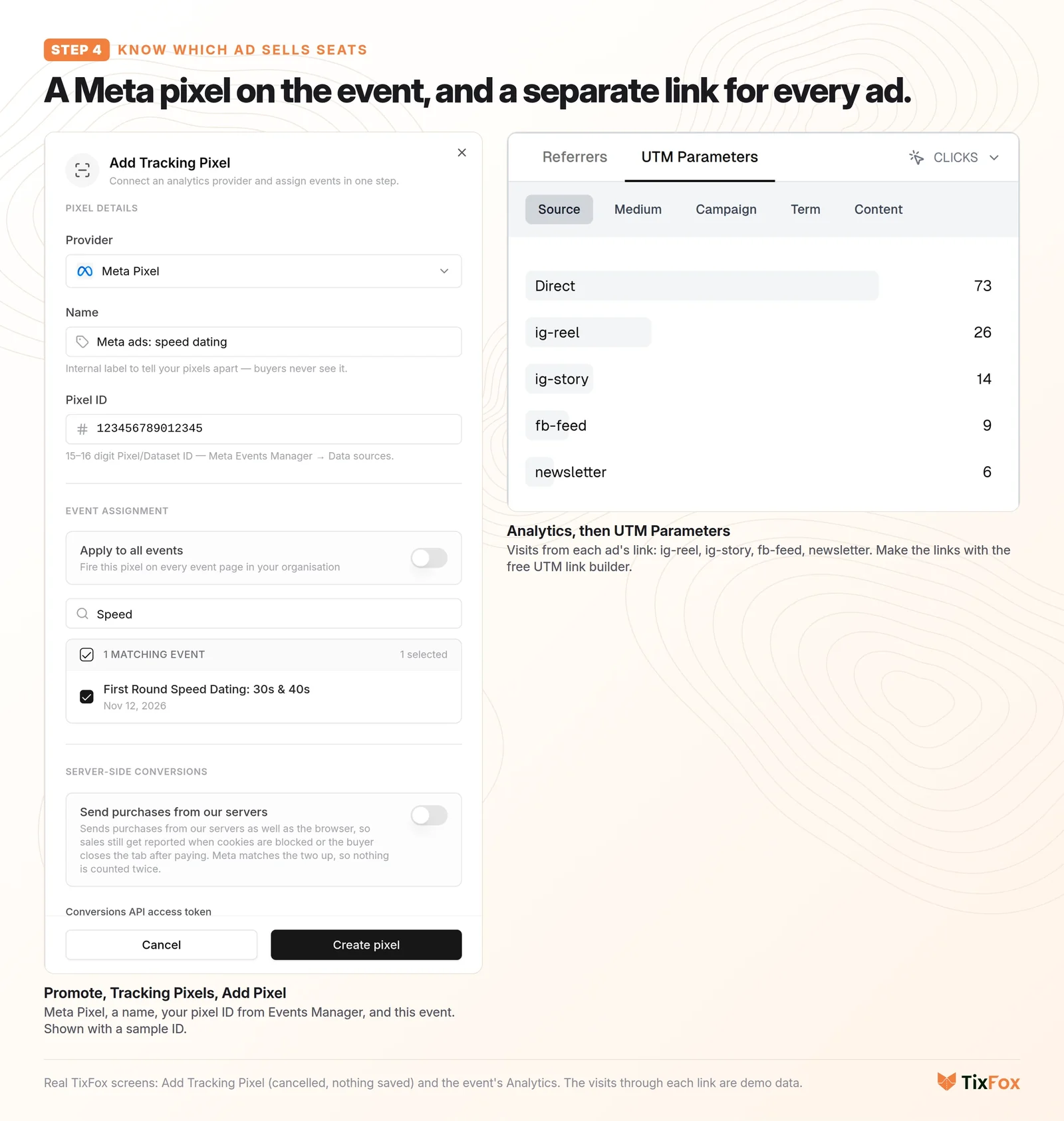
- Go to Promote, open Tracking Pixels, and click Add Pixel. Pick Meta Pixel, give it a name, paste your pixel ID from Meta's Events Manager, and tick this event. Meta then sees every real purchase with the amount, so Ads Manager can show you which ad sold the seats. TixFox also supports Google Analytics 4, Google Tag Manager, Reddit and X pixels (tracking pixels).
- Give each ad its own link with TixFox's free UTM link builder: paste your event link and name the source after the ad, like ig-reel or fb-feed.
- After a week, open Analytics, then UTM Parameters, to see how many people each ad brought to your page.
Step 5: The week before, check both sides
A few days out, open your Event Summary. It shows each side on its own: in the demo, women are at 12 sold and men at 9 sold, with 3 to go. That's your to-do list:
- Point your ad money at the short side.
- Ask your regulars to bring a friend (who buys their own ticket).
- Line up a couple of seat fillers now, not at 7:10 on the night. The New York host remembers delaying the start while calling around friends "to get some seat fillers."
Reminders go out on their own: every guest gets an email a week before and again the day before (automatic reminders). Every no-show leaves someone sitting out a round, so that email matters. For more on this, see how to reduce no-shows.
Step 6: On the night
Get there 45 minutes early. Number the tables, and put name tags, score cards and pens on the check-in table.
Scan tickets with the TixFox app, or hand the door to a friend: under Check-in Assistants, click Add Scanner and enter their email. They can scan tickets for this event, and they can't see your sales or payouts (check-in assistants). Issued Tickets shows how many people are checked in, so you can start the first date when both sides are there.
Still one or two off? Someone sits out a round. That's fine. As the Austin host put it, a gap of one or two "could even be appreciated, giving attendees time to use the restroom or grab another drink."
Step 7: The morning after, send the matches
Go through the score cards and find every mutual yes. Then open Orders and click Export. You get every guest's name, email, ticket type and age in one sheet, one row per guest because each order holds one ticket.
TixFox doesn't do the matching for you. Your score cards do that. But everything you need to email the matches is in that export. A short email works:
Hi Jenna, Tom (#4) said yes too. Here's his email: [email protected]. Have fun!
The New York host added a nice touch: guests with no match got 20% off their next night.
Then run it again next month
Open the event's menu and click Duplicate Event. Change the date, or change the bracket (20s and 30s next month). The ticket types, the caps and the age question come with it (duplicate events).
What it costs to sell speed dating tickets
TixFox is free to set up and charges 39¢ per ticket (30¢ under $5), plus Stripe's card processing of 2.9% + 30¢. By default the fees go on top of your price, so on a $35 ticket the guest pays $36.76 at checkout and you keep $35. On a sold-out night of 24 guests, the TixFox fees add up to $9.36 across all the tickets. See TixFox pricing.
Ready for your next night? Create your event on TixFox and set one ticket type per side. Free to set up, 39¢ a ticket.
Mistakes that unbalance the room
- One ticket for everyone. You find out the ratio at the door. Make one ticket type per side.
- Two tickets per order. The friend's email never reaches you, and they don't get their matches. Use 1 per order.
- Different prices per side. It can break the law in some states. Same price, separate caps.
- No age question. One guest far outside the bracket changes the night for everyone at their tables.
- Ads you can't trace. If ads are your biggest cost, put a pixel on the event and a separate link on each ad.
- Calling seat fillers at 7:10. Check both sides a few days out and line them up then.
FAQ
How many people do you need for a speed dating event?
Ten to fourteen per side works well, so 20 to 28 guests. The Austin host aimed for 10 women and 10 men and found bigger nights overwhelming. Twelve per side gives everyone twelve first dates.
How long should each speed date be?
Three to eight minutes is normal. Five minutes plus one to switch is a good default: twelve dates then take about 70 minutes, plus a short break in the middle.
How do you keep the men and women balanced at speed dating?
Sell one ticket type per side, each with its own cap, so one side sells out while the other stays on sale. Then check both sides a few days out, point your ads at the short side, and line up seat fillers. If you're still one or two off on the night, someone sits out a round.
Can you charge men and women different prices for speed dating?
It's safer not to. In California, sex-based price discounts are illegal under the Unruh Civil Rights Act (Koire v. Metro Car Wash, 1985; Civil Code 51.6). Keep the price the same and balance with caps instead. Check your own state's rules.
How do you match people after speed dating?
Guests mark yes or no for each date on a score card. The next day, find every mutual yes and email both people the other's email. With TixFox, Orders, Export gives you every guest's name, email, ticket type and age in one sheet.
How much should you charge for speed dating tickets?
Most US speed dating nights we looked at charge somewhere between $25 and $60. The Austin host averaged $25 a ticket and found ads were most of the cost, so price for your ad spend, not just the venue.
Sources
- "Dating Experiments", dkras.substack.com: 30 speed dating events in Austin, TX, 2021 to 2022 (group size, the ratio, venues, ticket prices, ad costs, profitability).
- "My stint as a speed dating hostess", fatherkarine.substack.com: a New York host (the bell, seat fillers, matches by email, 20% off for no match).
- Boston Single Mingle listing on thebostoncalendar.com ("if your ticket type is sold out, please DO NOT BUY THE OTHER TICKET", score cards, matches within 24 hours).
- Eventbrite's speed dating guide: "between three and eight minutes is normal."
- Koire v. Metro Car Wash (Cal. 1985) and California Civil Code 51.6 on sex-based price discounts.
- TixFox dashboard, demo account, October 15, 2026: ticket types, custom fields, tracking pixels, Analytics, check-in assistants, Orders export, Duplicate Event. Fees from tixfox.co/pricing and a real checkout for a $35 ticket.
The night ("First Round Speed Dating" at "Juniper Wine Bar"), its guests and its ad visits are demo data. The TixFox screens, the ticket page and the checkout are real.
Keep more of every ticket sale.
- 39¢ per ticket, $0 on free events
- No monthly fee, no contract
- Get paid as each sale comes in