Updated October 2026: new guide with a video walkthrough, Wix's current fees and plan rules, and real screens of the checkout on a Wix-style page, all checked on October 9, 2026.
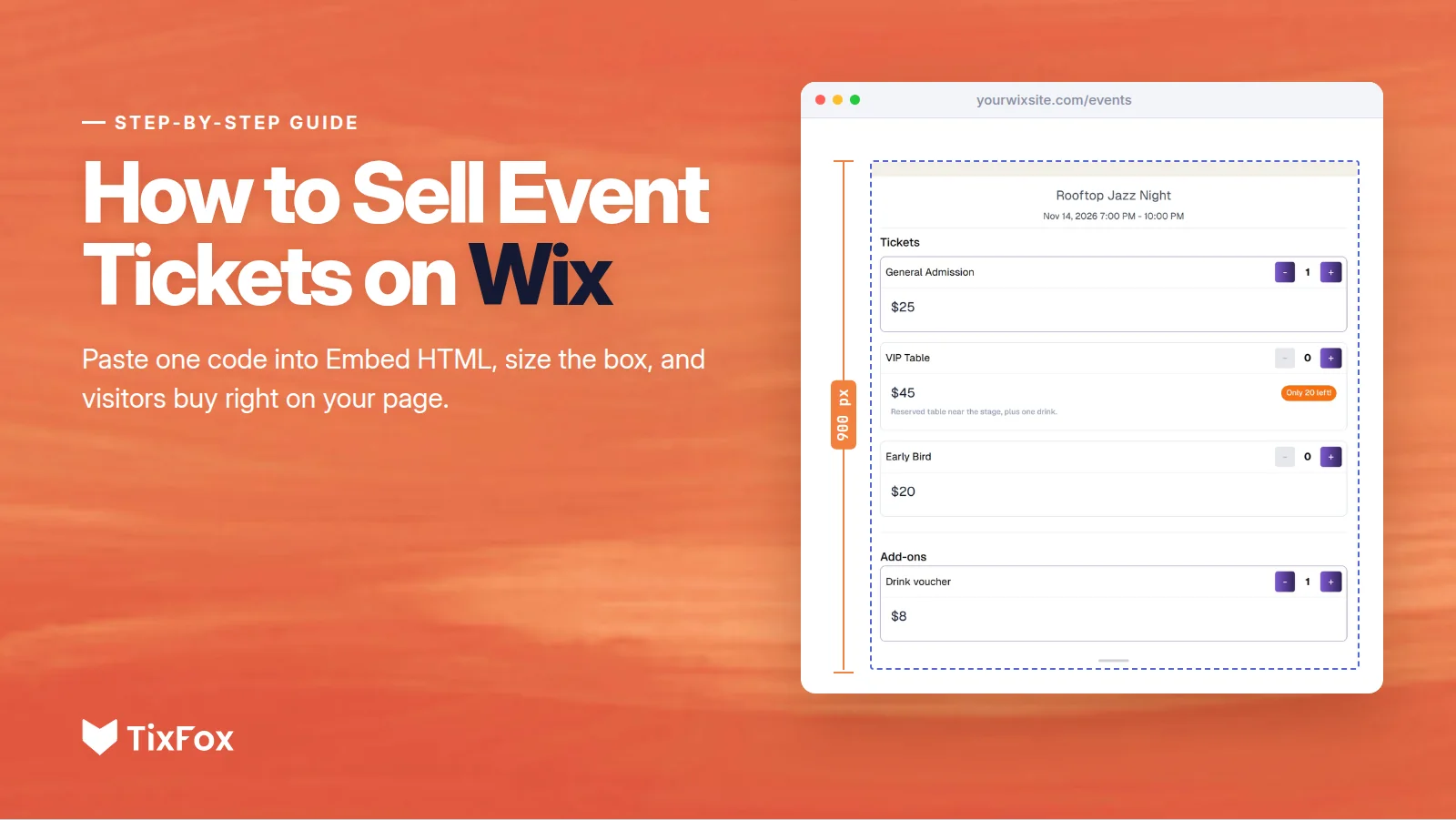
To sell event tickets on Wix with TixFox, copy the Basic iFrame code from your event's Embed window, paste it into a Wix Embed HTML element, and make the box 900 pixels tall. Your tickets then sit right on your page. Visitors pick their tickets, enter their details and pay without leaving your Wix site, and every ticket arrives by email with its own QR code.
The one thing most guides miss is the box size. Wix shows pasted code inside a frame of a fixed size, so a box that's too short cuts your checkout off. This guide shows each step, which TixFox code to use on Wix, and how the fees compare with Wix Events.
Watch: sell tickets on Wix in three minutes
The video covers Wix Events' fee at 0:10, copying your code at 0:36, pasting it into Embed HTML at 1:03, what your visitors see at 1:42, and the button option at 2:10.
Can you sell tickets on Wix?
Yes, in two ways. Wix has its own ticketing app, Wix Events, and you can also embed a ticketing platform like TixFox in an Embed HTML element. Both put tickets on your Wix site, both give buyers QR tickets, and both have a check-in app for the door. For paid tickets, the main difference is the fee on every ticket.
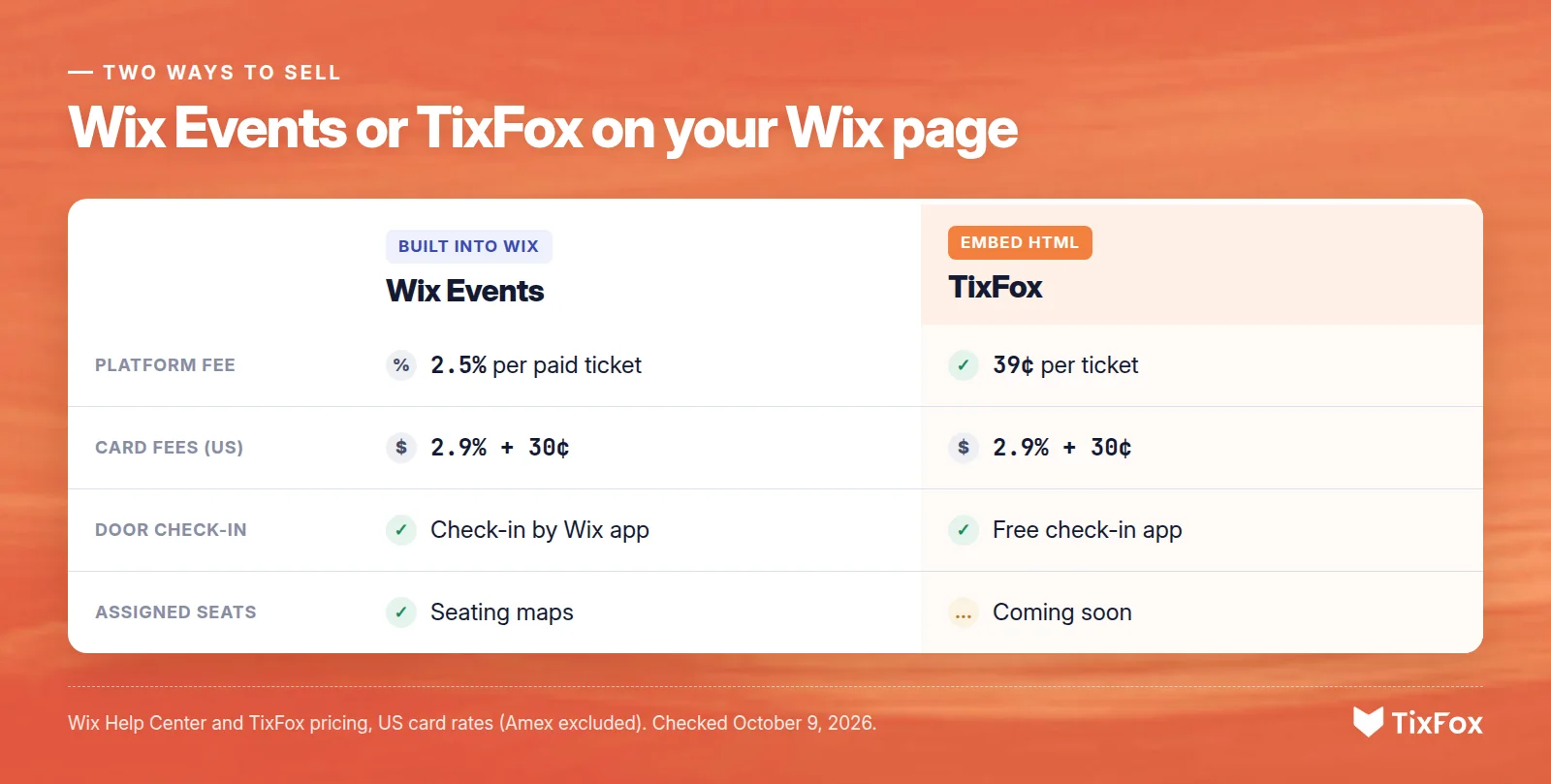
- Wix Events: built into your Wix dashboard. Wix charges a 2.5% ticket service fee on every paid ticket, on top of card processing, and selling paid tickets needs a Wix plan that accepts payments.
- TixFox on your Wix page: you copy one code from TixFox and paste it into Wix. TixFox charges 39¢ a ticket (30¢ under $5) plus Stripe's card processing, and there's no TixFox monthly fee.
How to sell event tickets on Wix, step by step
You need a Wix site and a free TixFox account with your event set up. If you haven't created your event yet, our guide to selling event tickets online covers ticket types, prices and connecting Stripe.
Step 1: Copy your code in TixFox
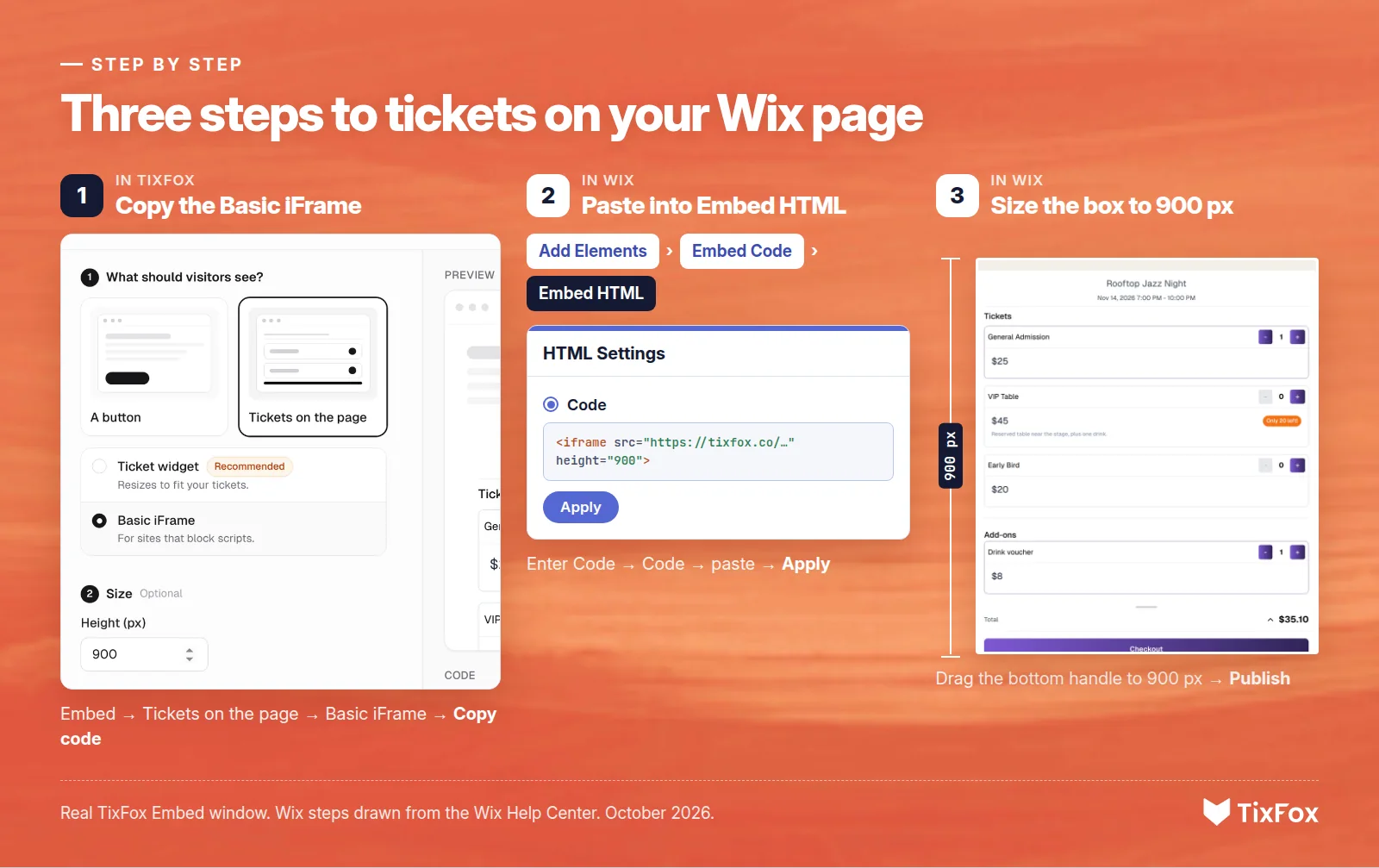
- In TixFox, open your event and click Embed.
- Under "What should visitors see?", choose Tickets on the page, then Basic iFrame.
- Leave the height at 900 pixels and remember that number.
- Click Copy code.
The Embed window has a short Wix guide too. It's linked under the code box.
Step 2: Paste it into a Wix Embed HTML element
- Open your site in the Wix Editor and go to the page for your tickets.
- Click Add Elements on the left, then Embed Code, and choose Embed HTML.
- Click the new element, then Enter Code.
- Choose Code, paste yours under "Add your code here" and click Apply.
Your tickets usually show up in the editor right away. If they don't, check Preview, since custom code can look different in the editor. Wix only displays code that loads over HTTPS, and TixFox's code does.
Step 3: Make the box 900 pixels tall and publish
The new element starts out short, so it cuts off the bottom of your tickets. Drag its bottom handle down until the box is 900 pixels tall, the same height as the code. Then click Publish. Saving alone doesn't put changes on your live site.
Why the box size matters on Wix
Wix shows Embed HTML code inside an iframe, a window of a fixed size on your page. That window doesn't grow with your tickets, and a pop-up can't open on top of your page. So use a TixFox code with a fixed height, and make the Wix box the same height.
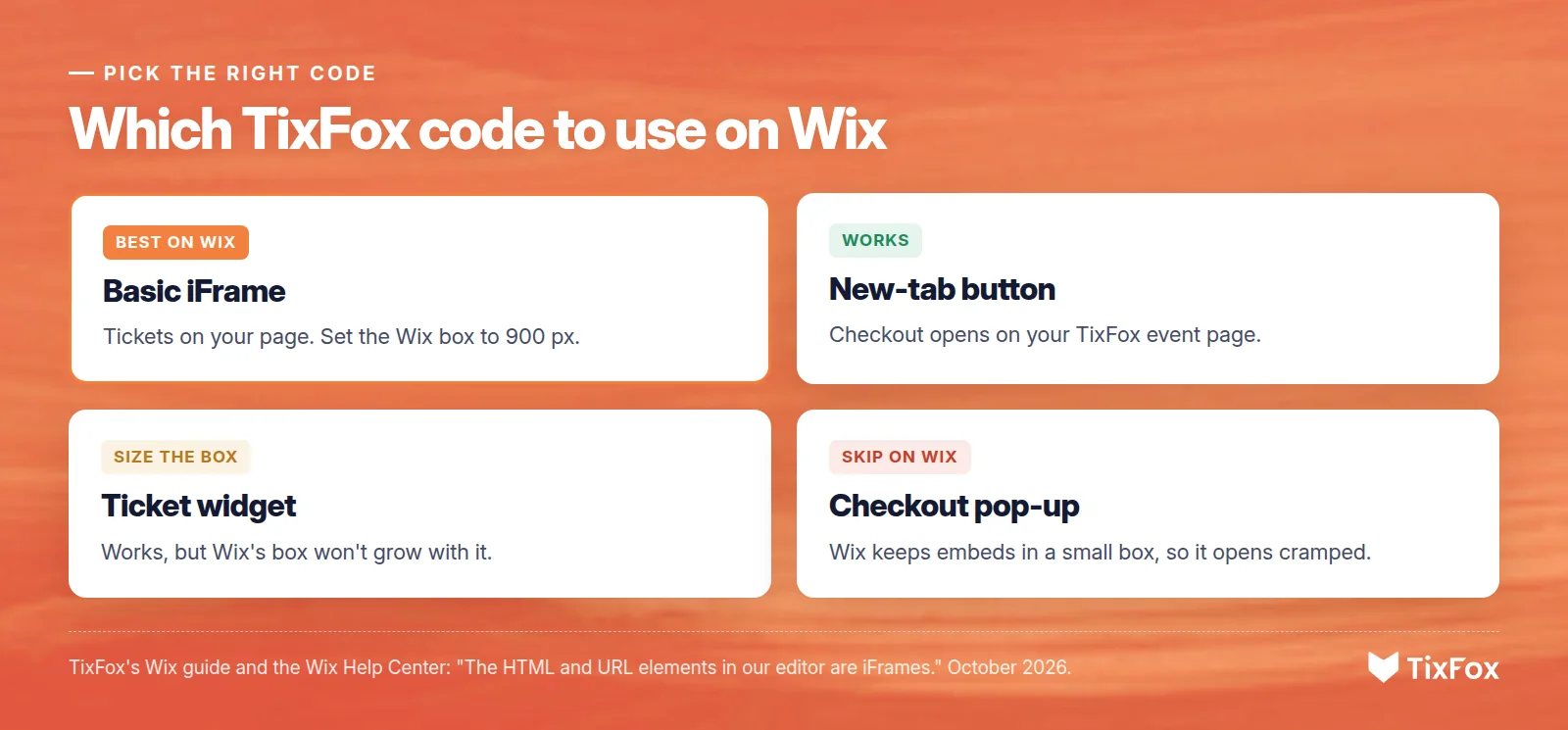
Wix's own embed guide puts it plainly: "The HTML and URL elements in our editor are iFrames." That's why the TixFox code you'd pick on Squarespace or WordPress, the button that opens checkout on top of your page, isn't the one to use on Wix. On Wix, that pop-up would stay inside the small embed box. TixFox's Wix guide flags this right in the Embed window: "Wix keeps embeds in a small box, so checkout would open cramped."
Before recording the video, we tested the Basic iFrame, the ticket widget and the new-tab button on a page set up the way Wix publishes embeds: the code on another domain, inside an iframe with Wix's documented sandbox. The Basic iFrame and the ticket widget both showed the tickets and took buyers all the way to the card form. The new-tab button opened the event page in a new tab.
What your visitors see
Visitors scroll to your tickets, choose how many of each type they want, and add extras like a drink voucher or parking. Then they enter their name and email, plus any custom questions you've added, and pay by card. They never leave your Wix page.
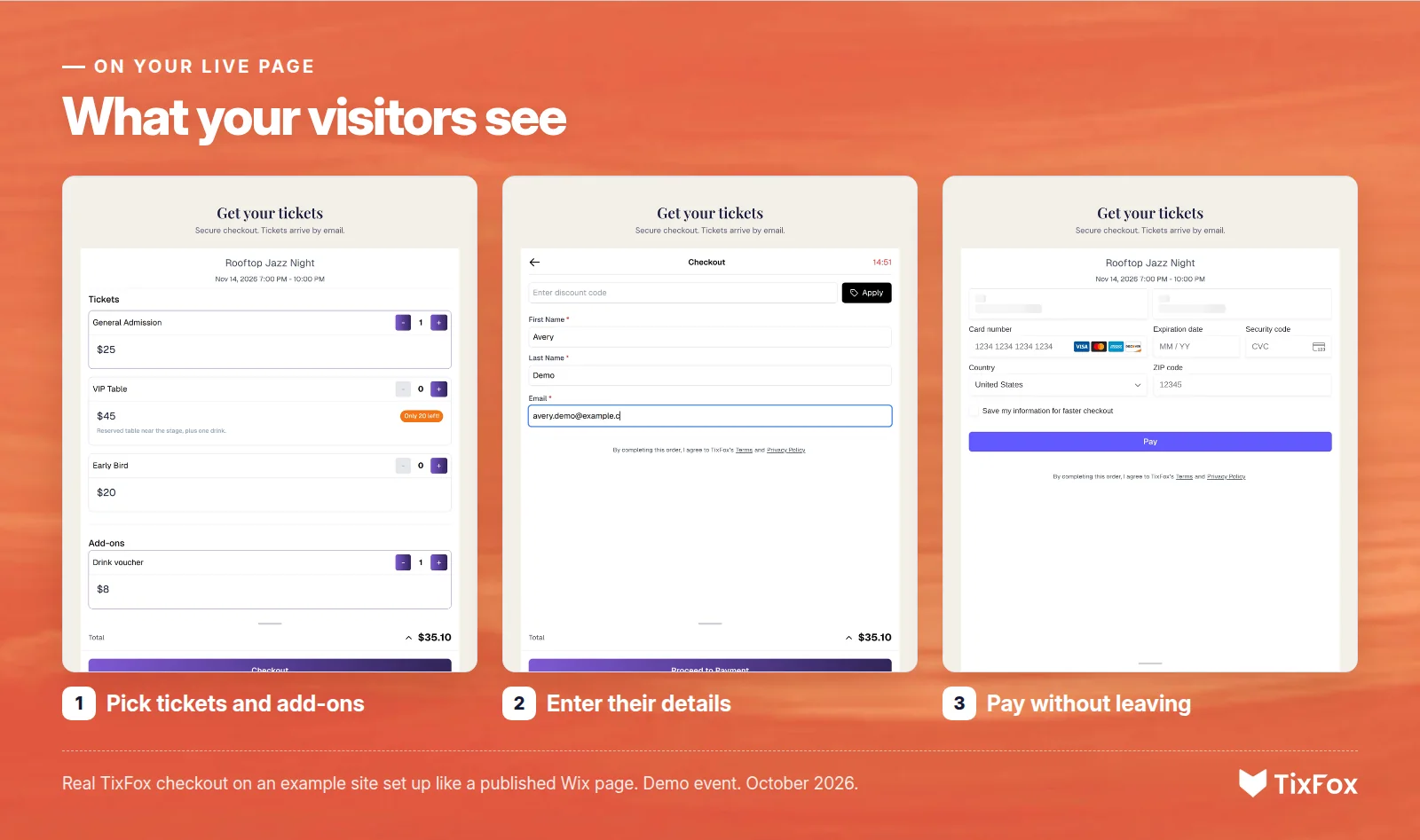
Payment runs through Stripe, and each ticket arrives by email with its own QR code. Every order shows up in your TixFox dashboard as it happens, and the money goes straight into your own Stripe account as each ticket sells. You can pay your venue or suppliers before the event.
Prefer a button? Use the new-tab button on Wix
If you'd rather show a Get Tickets button than the full checkout, TixFox has one that works well on Wix.
- In Embed, choose A button, then Open event page in a new tab. If you click the Wix guide first, its Use the new-tab button instead link switches it for you.
- Pick your colors, corners and size so the button matches your site, then click Copy code.
- In Wix, add Embed HTML, paste the code and click Apply.
- Shrink the box to fit the button, then publish.
Visitors click the button, and your TixFox event page opens in a new tab, where they check out.
What it costs to sell tickets on Wix
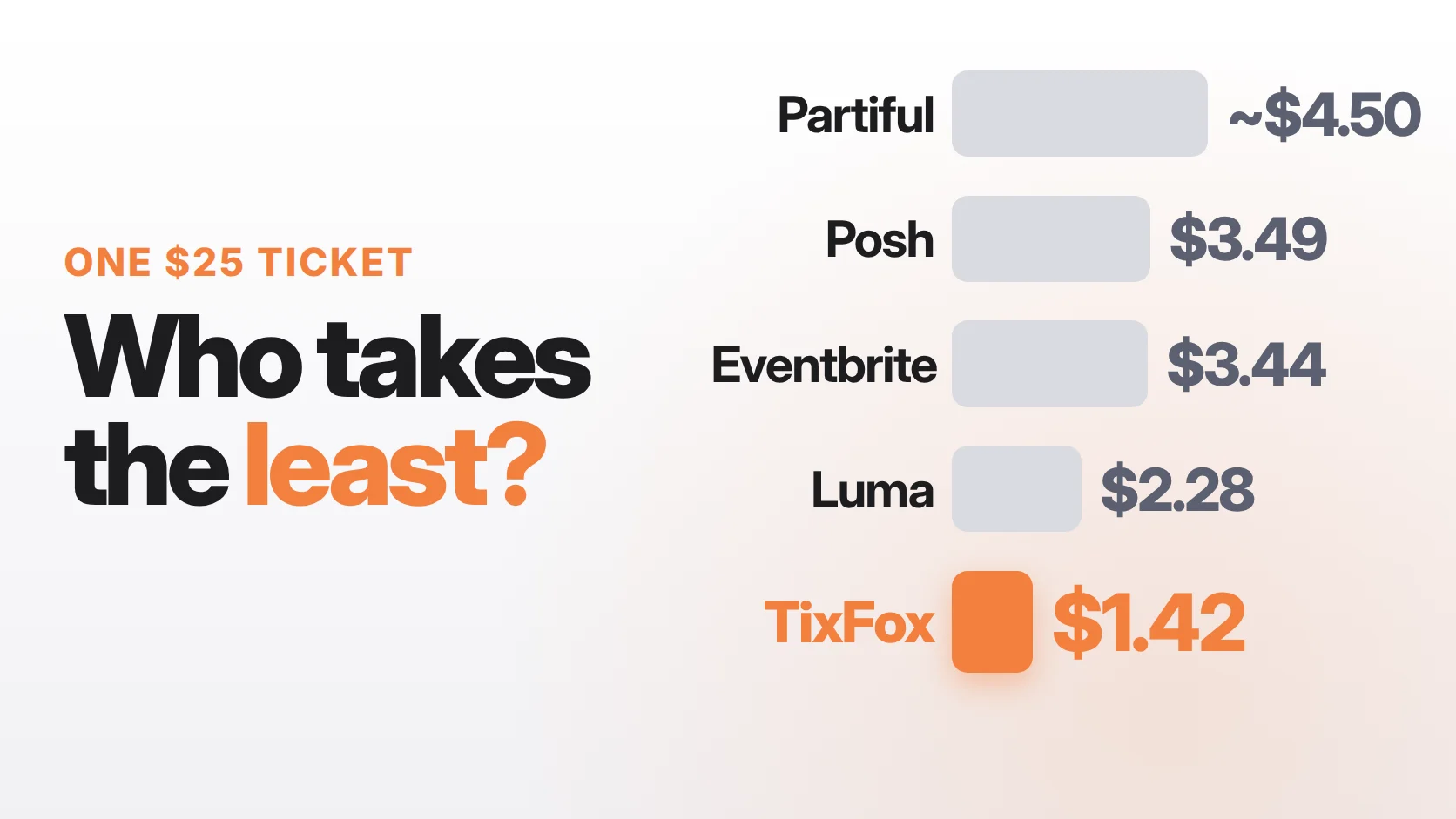
Wix Events charges a 2.5% ticket service fee on every paid ticket, plus card processing (2.9% + 30¢ per US card payment with Wix Payments, or 3.7% + 30¢ for American Express). TixFox charges 39¢ per ticket (30¢ under $5) plus Stripe's 2.9% + 30¢, and nothing for free events. On a $100 ticket, the platform fee is $2.50 on Wix Events and 39¢ on TixFox.
Card processing costs about the same either way, so the platform fee is where the two differ. Wix's 2.5% is a percentage and TixFox's 39¢ is flat, so the cheaper one depends on your ticket price. Below about $15.60, Wix's 2.5% is the smaller fee: 25¢ on a $10 ticket. Above $15.60, TixFox's 39¢ is smaller, and the gap grows with the price:
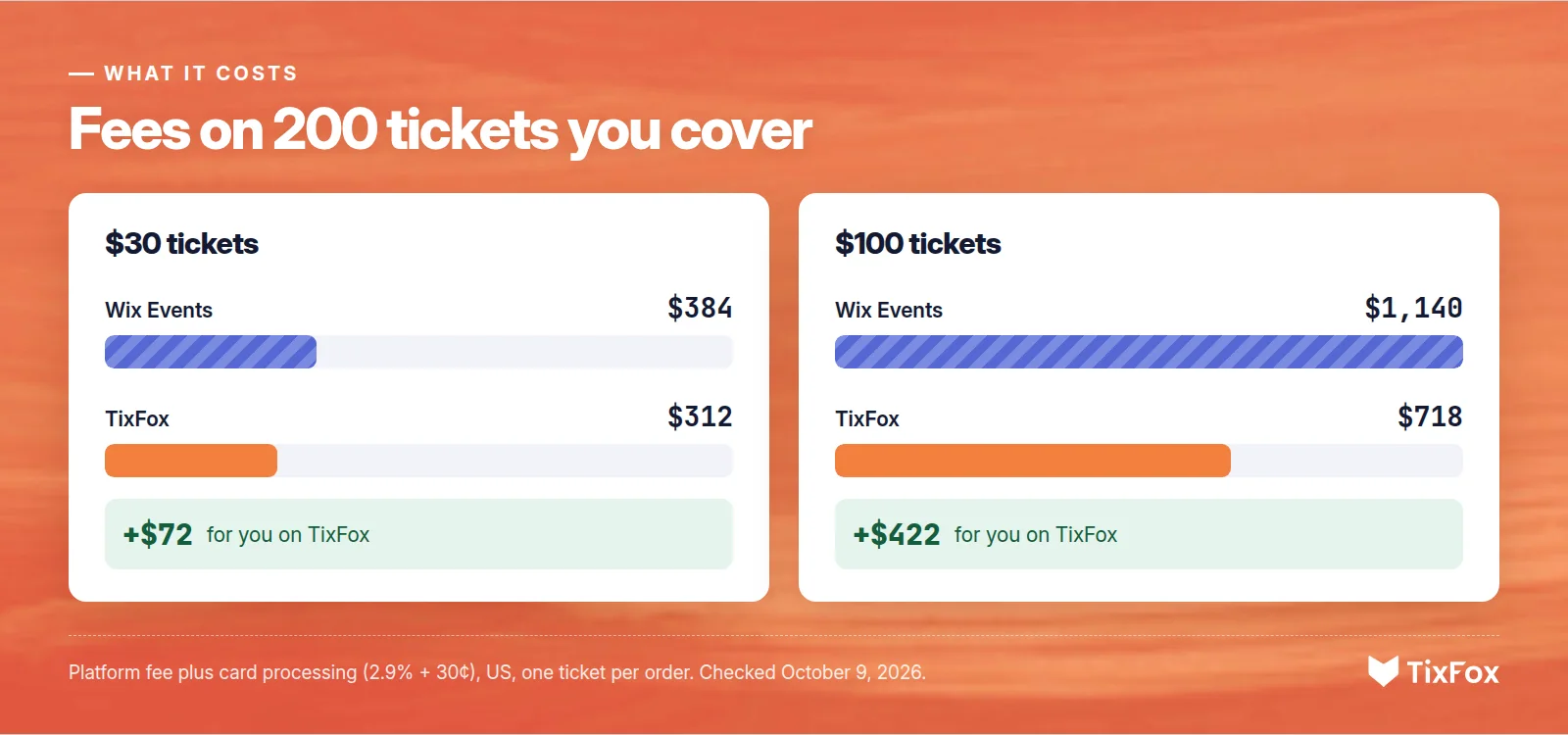
- 200 tickets at $30: you keep $5,688 on TixFox against $5,616 on Wix Events. That's $72 more.
- 200 tickets at $100: you keep $19,282 on TixFox against $18,860 on Wix Events. That's $422 more.
Both examples assume you cover the fees, US card rates for cards other than American Express, and one ticket per order. On TixFox, you can also pass the fee on to buyers instead. Wix lets you pass on its 2.5% ticket service fee too.
To sell paid tickets with Wix Events, Wix says to upgrade to a plan that accepts payments, such as Core or Business. On Wix's plans page, Core starts at $29 a month, billed yearly. Wix's blog says Wix "does not charge a commission on your ticket sales", but its Help Center lists the 2.5% ticket service fee, so check the Help Center when you compare.
When Wix Events is the better choice
Wix Events may fit better if:
- You need assigned seats today. Wix Events has seating maps with seat assignments and ticket zones. Reserved seating on TixFox is coming soon.
- Your tickets cost less than about $15. Below $15.60, Wix's 2.5% fee is less than TixFox's 39¢.
- You want everything in one Wix dashboard. If you already run your store, bookings and emails in Wix, keeping tickets there means one less login.
- Your event is free. Wix doesn't charge its ticket service fee on free tickets. TixFox is free for free events too, so either works.
For tickets above $15.60, TixFox on your Wix page has the lower platform fee, and you still get a free check-in app and Tap to Pay for selling at the door.
If your tickets don't look right on Wix
- The checkout is cut off. The box is shorter than the code. Drag the bottom handle down to 900 pixels.
- There's a scroll bar inside the box. Same fix: make the box as tall as the code. With the ticket widget, make it tall enough for your full checkout.
- The checkout opens squeezed inside a small box. You used "Open checkout on my site." On Wix, use Basic iFrame or the new-tab button instead.
- Your changes aren't on the live site. Click Publish. Saving alone doesn't publish your site.
- Nothing shows in the box. Check that you pasted the whole code, including the closing tag, and that it starts with https.
Make your Wix ticket page easy to buy from
- Put tickets on their own page, or high up on your event page, and add it to your site menu.
- Use ticket tiers. Early bird, general admission and VIP tickets, each with its own price, give people a reason to buy now.
- Sell add-ons like parking, merch or drink vouchers in the same checkout.
- Give partners their own discount codes so you can see who sells.
- Track your links with UTM tracking to see which posts and emails sell tickets.
- Be ready at the door. Scan tickets with the free TixFox check-in app. Our guide to QR code tickets covers check-in.
On another website builder? See how to sell event tickets on Squarespace or WordPress.
Ready to sell tickets on your Wix site? Create a free TixFox account, set up your event and copy your code. No credit card is needed, there's no monthly fee, and free events cost nothing.
FAQ
Can you sell event tickets on Wix?
Yes. You can use Wix's own Wix Events app, or embed a ticketing platform like TixFox with an Embed HTML element. Both let buyers get tickets on your Wix site.
How do I add a ticketing widget to my Wix site?
In TixFox, open your event, click Embed, choose Tickets on the page and Basic iFrame, and copy the code. In the Wix Editor, click Add Elements, then Embed Code, then Embed HTML. Click Enter Code, choose Code, paste and click Apply. Make the box 900 pixels tall and publish.
Does Wix charge a fee for selling tickets?
Yes, with Wix Events. Wix's Help Center lists a 2.5% ticket service fee on paid tickets, separate from card processing. Free tickets have no ticket service fee.
Why is my embedded checkout cut off on Wix?
Wix shows embedded code inside a box of a fixed size. If the box is shorter than your code, the bottom gets cut off. Drag the box's bottom handle until it's as tall as the code: 900 pixels for TixFox's Basic iFrame.
Can buyers pay without leaving my Wix site?
Yes. With TixFox's Basic iFrame in an Embed HTML element, buyers choose tickets, enter their details and pay by card right on your page. Each ticket arrives by email with a QR code.
Is TixFox cheaper than Wix Events?
For tickets above about $15.60, yes. TixFox charges a flat 39¢ per ticket, and Wix Events charges 2.5%, so Wix's fee is smaller on cheaper tickets. Card processing is about the same on both. On 200 tickets at $100, with you covering the fees, you keep $422 more on TixFox.
Can I sell tickets for a recurring event on Wix?
Yes. Set the event up as a recurring event in TixFox, and buyers pick a date and time from a calendar when they buy.
Sources
- Wix Help Center: Embedding a Site or a Widget, Adding an HTML iFrame Element, Wix Ticket Service Fees, Wix Payments Service Fees, Upgrading Your Site and Check-in by Wix. Wix plans (US, billed yearly) and Wix's guide to selling event tickets. Checked October 9, 2026.
- TixFox: Pricing, FAQ and the Embed Event window in the TixFox dashboard. Checkout screens are real, shown on an example site with a demo event, October 2026.
Keep more of every ticket sale.
- 39¢ per ticket, $0 on free events
- No monthly fee, no contract
- Get paid as each sale comes in